
VectorMagic is a free online tool from the Standford University AI lab for converting bitmap images to vector formats. The image below shows an example of what you might use this tool for.
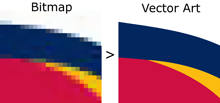
I just heard about the software and tried it out with a fairly complex image, a sample of Japanese calligraphy, and it did a beautiful job converting the image from bitmap to EPS (Encapsulated PostScript).
The software supports JPEG, GIF, PNG, BMP, and TIFF input. It supports EPS, SVG, and PNG output.
(In case you’re not familiar with graphic formats, a bitmap image is a matrix of dots. The format records what color each dot is. That works fine when an image is displayed at its original resolution. But if you make the image bigger, you just get bigger dots and things look grainy. A vector format stores the formulas for the curves that make up the image, not the dots, and computes the dots when it’s time to display the image. If you make an image larger, it computes new dots according to the formulas. Software for making bitmaps smaller is common. Software that does a good job of making bitmaps larger is rare.)
Update: VectorMagic has moved to a new domain. I’ve corrected the link above.
Definitely need to give this a try. I’ve done this in the past through a variety of methods, but this looks extremely promising…
Been there and did that.
Found the site before I found this review.
Their T&C page states that they are allowed “forever” use of any image uploaded – and – there are only two free conversions allowed per account (and you’re discouraged from setting up multiple accounts).
Other than those “minor” considerations – the conversion worked great!
Thanks!
Have you guys tried copyartwork.com? its for a fee but there is actually someone who do it for you, if you are busy doing something else.
Also look into filespazz.com, they convert files from to coral to another format (for free) if you not a coral person.
Not really free, only 2 free conversions after you give them contact info.
thank you
It’s a nice software, but the result is not the same. That’s why I chose CorelDraw for this after reading about it here http://www.coreldraw.com/en/pages/raster-to-vector/ and I find the quality and the results much better then with VectorMagic