
Readable path listings

Windows has never made it easy to read long environment variables. If I display the path on one machine I get something like this, both from cmd and from PowerShell.

C:bin;C:binPython25;C:binTeXmiktexbin;C:binTeXMiKTeXmiktexbin;C:binPerlbin;C:ProgramFilesCompaqCompaq Management AgentsDmiWin32Bin; ...

The System Properties window is worse since you can only see a tiny slice of your path at a time.
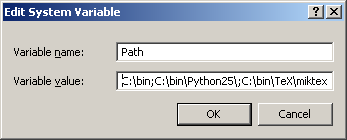
screen shot of path UI

Here’s a PowerShell one-liner to produce readable path listing:

$env:path -replace ";", "`n"

This produces

C:bin
C:binPython25
C:binTeXmiktexbin
C:binTeXMiKTeXmiktexbin
C:binPerlbin
C:Program FilesCompaqCompaq Management AgentsDmiWin32Bin
...

(If you’re not familiar with PowerShell, note the backquote before the n to indicate the newline character to replace semicolons. This is one of the most unconventional features of PowerShell since backslash is the escape character in most contexts. Because Windows uses either forward or backward slashes as path separators, PowerShell could not use backslash as an escape character. Think of the backquote as a little backslash. Once you get over the initial shock, you get used to the backquote quickly.)

Update: It occurred to me after the original post that there’s an even simpler way to display the path.

$env:path.split(';')

Tips for learning regular expressions

Here are a few realizations that helped me the most when I was learning regular expressions.

1. Regular expressions aren’t trivial. If you think they’re trivial, but you can’t get them to work, then you feel stupid. They’re not trivial, but they’re not that hard either. They just take some study.

2. Regular expressions are not command line wild cards. They contain some of the same symbols but they don’t mean the same thing. They’re just similar enough to cause confusion.

3. Regular expressions are a little programming language. Regular expressions are usually contained inside another programming language, like JavaScript or Python. Think of the expressions as little bits of a foreign language, like a French quotation inside English prose. Don’t expect rules from the outside language to have any relation to the rules inside, no more than you’d expect English grammar to apply inside that French quote.

4. Character classes are a little sub-language within regular expressions. Character classes are their own little world. Once you realize that and don’t expect the usual rules for regular expressions outside character classes to apply, you can see that they’re not very complicated, just different. Failure to realize that they are different is a major source of bugs.

Once you’re ready to dive into regular expressions, read Jeffrey Friedl’s book (ISBN 0596528124). It’s by far the best book on the subject. Read the first few chapters carefully, but then flip the pages quickly when he goes off into NFA engines and all that.

***

For daily tips on regular expressions, follow @RegexTip on Twitter.