Text case changes the size of QR codes

Let’s make a QR code out of a sentence two ways: mixed case and upper case. We’ll use Python with the qrcode library.

>>> import qrcode
>>> s = "The quick brown fox jumps over the lazy dog."
>>> qrcode.make(s).save("mixed.png")
>>> qrcode.make(s.upper()).save("upper.png")

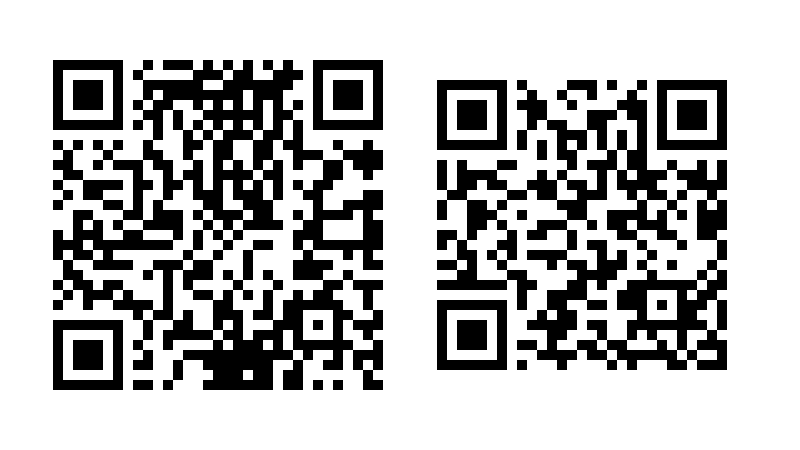
Here are the mixed case and upper case QR codes.

The QR code creation algorithm interprets the mixed case sentence as binary data but it interprets the upper case sentence as alphanumeric data.

Alphanumeric data, in the context of QR codes, comes from the following alphabet of 45 characters:

0123456789ABCDEFGHIJKLMNOPQRSTUVWXYZ $%*+-./:

Since 45² = 2025 < 2048 = 211 two alphanumeric characters can be encoded in 11 bits. If text contains a single character outside this alphabet, such as a lower case letter, then the text is encoded as ISO/IEC 8859-1 using 8 bits per character.

Switching from mixed-case text to upper case text reduces the bits per character from 8 to 5.5, and so we should expect the resulting QR code to require about 30% fewer pixels. In the example above we go from a 33 × 33 grid down to a 29 × 29 grid, from 1089 pixels to 841.

Application to Bitcoin addresses

Bech32 encoding uses an alphabet of 32 characters while Base58 encoding uses an alphabet of 58 characters, and so the former needs about 17% more characters to represent the same data. But Bech32 uses a monocase alphabet, and base 58 does not, and so Bech32 encoding requires fewer QR code pixels to represent the same data as Base58 encoding.

(Bech32 encoding uses a lower case alphabet, but the letters are converted to upper case before creating QR codes.)

Related posts

Monero’s seed phrase words

I wrote a couple posts last month about the seed phrase words used by Bitcoin and other cryptocurrencies. There are 2048 words on the BIP39 list. Monero uses a different word list, one with 1626 words [1]. You can find Monero’s list here.

Why 1626 words?

It’s not hard to guess why the BIP 39 list has 2048 words: each one encodes 11 bits of a key because 211 = 2048. It’s not as obvious where the number 1626 comes from. It is the smallest value of n such that

n24 > 2256

Monero uses a seed phrase of 25 words, but the last word is a checksum, so there are 24 words which are used to create a 256-bit private key.

Distinctiveness

I criticized the BIP 39 list for being less than ideal for memorization because some words are similar phonetically, such as angle and ankle. Other words are harder to remember because they are not vivid nouns or verbs, such as  either or neither.

The Monero list has 200 words that differ by one character, compared to 484 for BIP 39.

But as with the BIP 39 list, some of Monero’s words are similar and not easy to visualize, such as adapt, adept, and adopt.

Prefix uniqueness

One nice feature of the BIP 39 list is that the first four letters of each word are distinct. So if you’re typing the words, autocomplete can fill in the rest of the word by the time you’ve entered four letters.

Monero goes one step further: all words are uniquely determined by the first three letters.

Overlap with other lists

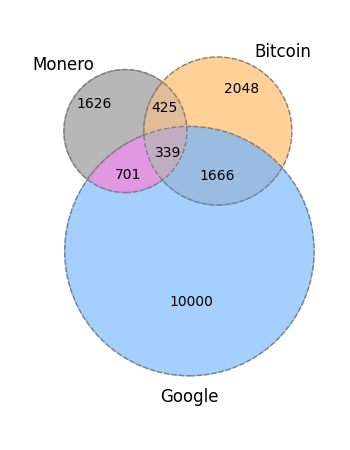
Only about 1/4 of the words on Monero’s list. And most of Monero’s words are not in Google’s list of 10,000 most common words.

venn diagram M: 1626, B: 2048, M∩B: 425, G: 10000, M∩G: 701, B∩G: 1666, M∩B∩G: 339

Related posts

[1] Monero has other ways to convert words to keys. The way described here is now known as the Legacy mnemonics. The new Polyseed algorithm uses the BIP 39 word list.

Retrofitting error detection

Bitcoin addresses include a checksum. The Base58Check algorithm uses the first four bytes of a hash function as a checksum before applying Base58 encoding.

Ethereum addresses did not include a checksum, but it became apparent later that a checksum was needed. How can you retroactively fit a checksum into an address without breaking backward compatibility? Here’s what Ethereum did in adopting the EIP-55 proposal.

Ethereum addresses are the last 20 bytes (40 hexadecimal characters) of the Keccak-256 hash of the public key. The protocol allowed the letters in hexadecimal addresses to be either upper or lower case. This option provided the wiggle room to retrofit a checksum. You could mix upper and lower case letters deliberately to encode an extra message (i.e. a checksum) on top of the key. This is sorta like steganography, except that it’s out in the open rather than hidden.

Hexadecimal notation uses 10 digits and 6 letters, and so the probability that a hexadecimal character is a letter is 6/16. On average a string of 40 hexadecimal characters will contain 15 letters. This means you could add 15 bits of information to an Ethereum address, on average, by alternating the case of the letters.

It’s conceivable that an address won’t contain any letters, or will consist entirely as letters. The number of letters in a random string of 40 hexadecimal characters is a binomial random variable with parameters n = 40 and p = 3/8, and this is approximately a normal random variable with mean 15 and standard deviation 3. This says the number of letters in an Ethereum address will be fairly tightly clustered around 15, rarely more than 21 or less than 9.

OK, but how do you take advantage of an average of 15 bits of freedom? You can’t encode a 15-bit number because you might not have 15 bits at your disposal.

Here’s what EIP-55 did. Left-align the address and the Keccek-256 hash of the address (which was itself a hash: there are two hashes going on) and capitalize all letters in the address that align with a character in the hash greater than or equal to 8.

As an example, let’s suppose our address is

    7341e5e972fc677286384f802f8ef42a5ec5f03b

This address contains 13 letters, which would not be unusual. Now let’s compute its hash.

    >>> from Crypto.Hash import keccak
    >>> kh = keccak.new(digest_bits=256)
    >>> kh.update(b"7341e5e972fc677286384f802f8ef42a5ec5f03b").hexdigest()
    'd8e8fcb225fb835fdb89a5918e736820ec75b3efaf3cbb229f03cdc41bf9f254'

Now we line up the address and its hash.

    341e5e972fc677286384f802f8ef42a5ec5f03b
    d8e8fcb225fb835fdb89a5918e736820ec75b3e...

The characters in the address that line up with a hash character of 0x8 through 0xf are highlighted red. The digits will be left alone, but the red letters will be turned to upper case.

    341E5E972fc677286384F802F8ef42a5EC5f03B

Related posts

Advantages of Reed-Solomon codes over Golay codes

When Voyager 1 and 2 left Earth, their internal computers were programmed to use Golay error correction codes. Images transmitted from Jupiter and Saturn were encoded using Golay codes. After leaving Saturn, the software was upgraded to use Reed-Solomon error correction codes.

I didn’t realize how much difference the change of encoding made until I ran across a JPL report that elaborated on the efficiency of both codes.

Encoding these data has a price, and that paid for the old Golay encoding algorithm (used at Jupiter and Saturn) was one code bit overhead for every data bit (100 percent). The new RS encoding scheme reduces this overhead to about 20 percent. In addition, it reduces the number of bit errors from 5 in 100,000 to only 1 in a million!

So switching to Reed-Solomon cut overhead by 5x and improved error correction 50x.

There’s a reason CDs use Reed-Solomon codes and not Golay codes.

Related posts

National Provider Identifier (NPI) and its checksum

Healthcare providers in the United States are required to have an ID number known as the NPI (National Provider Identifier). This is a 10-digit unique identifier which serves as the primary key in a publicly available database. You can use the NPI number to look up a provider’s name, credentials, their practice location, etc. The use of NPI numbers was required by HIPAA.

The specification for the NPI number format says that the first digit must be either 1 or 2. Currently every NPI in the database starts with 1. There are about 8.4 million NPIs currently, so it’ll be a while before they’ll need to roll the first digit over to 2.

The last digit of the NPI is a check sum. The check sum uses the Luhn algorithm, the same check sum used for credit cards and other kinds of identifiers. The Luhn algorithm was developed in 1954 and was designed to be easy to implement by hand. It’s kind of a quirky algorithm, but it will catch all single-digit errors and nearly all transposition errors.

The Luhn algorithm is not applied to the NPI itself but by first prepending 80840 to the (first nine digits of) the NPI.

For example, let’s look at 1993999998. This is not (currently) anyone’s NPI, but it has a valid NPI format because the Luhn checksum of 80840199399999 is 8. We will verify this with the code below.

Python code for Luhn checksum

The following code computes the Luhn checksum.

    def checksum(payload):
        digits = [int(c) for c in reversed(str(payload))]
        s = 0
        for i, d in enumerate(digits):
            if i % 2 == 0:
                t = 2*d
                if t > 9:
                    t -= 9
                s += t
            else:
                s += d
        return (s*9) % 10

And the following checks whether the last digit of a number is the checksum of the previous digits.

    def verify(fullnumber):
        payload = fullnumber // 10
        return checksum(payload) == fullnumber % 10

And finally, the following validates an NPI number.

    def verify_npi(npi):
        return verify(int("80840" + str(npi)))

Here we apply the code above to the hypothetical NPI number mentioned above.

    assert(checksum(80840199399999) == 8)
    assert(verify(808401993999998))
    assert(verify_npi(1993999998))

Related posts

Straddling checkerboard encryption

Introduction

Computers fundamentally changed cryptography, opening up new possibilities for making and breaking codes. At first it may not have been clear which side benefited most, but now it’s clear that computers gave more power to code makers than code breakers.

We now have cryptographic primitives that cannot be attacked more efficiently than by brute force, as far as we know. The weak link is how these primitives are implemented and combined, not the primitives themselves.

Before computers there was more of a cat and mouse game between encryption and cryptanalysis. Encryption schemes that were convenient to carry out by hand could usually be broken by hand eventually. But if you only needed secrecy briefly, a simple scheme might provide that secrecy for long enough. This post will look at one such scheme, the straddling checkerboard.

Checkerboards

Perhaps the most obvious way to conveniently turn letters into numbers is to arrange the letters into a 5 × 5 grid. This has to leave out one letter, and in practice this meant combining I and J. Or if you needed digits, you could use a 6 × 6 grid and put J back in. You’d scramble the alphabet in the grid according to some key, then encrypt each letter by its coordinates.

       12345
      +-----
     1|EBISP
     2|XWLVN
     3|AOYZQ
     4|MDCKH
     5|RTUFG

This is no better than a simple substitution cipher because someone intercepting a message encrypted this way would easily guess that pairs of digits represent letters. However, if you then permuted the digits with a transposition cipher, you’d have something more formidable. This is essentially what the ADFGV cipher did, which stumped cryptanalysts for a while.

The straddling checkerboard is a variation on the method above. Letters would be arranged in a 3 × 10 grid rather than 5 × 5. Some letters would be encrypted as a single digit and some as a pair of digits.

       1234567890
      +----------
      |  EBISPXWL
     1|VNAOYZQMDC
     2|KHRTUFGJ./

In the example above, E would be encrypted as 3, N would be encrypted as 12, and so on. This is an instance of a prefix code. In order to be able to decode the digits unambiguously, no letter could be encoded as 1 or 2; these digits always signaled the beginning of a pair.

Prefix codes are often used in non-secret codes, such as country codes for telephone numbers. More examples of prefix codes in this post.

Because 1 and 2 could not be used to encode single letters, there were 28 slots to fill. These could be filled with other symbols, and in practice period and slash were added [1].

Efficiency

The straddling checkerboard gives a more efficient encoding than does the checkerboard since typically fewer digits will be required. If efficiency were the only concern, we’d put the eight most frequent letters on the top row, something like the following [2].

       1234567890
      +----------
      |  ETAOINSR
     1|BCDFGHJKLM
     2|PQUVWXYZ./

This would be more efficient but less secure since the arrangement of the letters would be more predictable.

Security

The straddling checkerboard presents a bit of a challenge to the cryptanalyst since it’s not know a priori whether a digit is part of a pair (if the vertical coordinates are not always 1 and 2).

The straddling checkerboard didn’t offer much security even in its day. It would have been better if there had been some further processing done on the digits, such as how the ADFGV cipher permuted its coordinates.

The message, interpreted as a number N, could have been further encrypted as aN + b where a and b were randomly chosen numbers that were part of the key. As far as I know, nothing like this was ever done. This would have provided more security but would also require more effort and increase the chance of introducing errors.

Related posts

[1] David Kahn. The Codebreakers. Chapter 18.

[2] You may have expected the last letter on the first row to be H, going by the printer’s order ETAOIN SHRDLU. Peter Norvig discovered a slightly different order of letter frequencies based on the Google corpus.

Base 64 encoding remainder problem

I’ve mentioned base 64 encoding a few times here, but I’ve left out a detail. This post fills in that detail.

Base 64 encoding comes up in multiple contexts in which you want to represent binary data in text form. I’ve mentioned base 64 encoding in the context of Gnu ASCII armor. A more common application is MIME (Multipurpose Internet Mail Extensions) encoding.

Base 64 encoding uses 64 characters (A…Z, a…z, 0…9, +, and /) to represent six bits at a time.

In the previous post I showed how ASCII armor encoded a 91,272 byte JPEG image into a text file and how it could convert the text back into binary. The number of bytes in the file a multiple of 3, which you could quickly confirm by casting out nines.

If the number of bytes in a file is not a multiple of three, the number of bits is not a multiple of six, and so we have to do something with the remainder.

For an example, let’s start with a file containing the bits

000000 000001 000010 000011 000100 000101 000110 000111

If we run gpg --enarmor on this file, we get

ABCDEFGH
=/u99

and some extra text for human consumption. The base 64 encoding is ABCDEFGH, the equal sign is a separator, and /u99 is a checksum.

If we delete the last 8 bits from our file and run ASCII armor again, we get

ABCDEFE=
=/IPL

The second equal sign separates the base 64 encoding from the checksum, but the first equal sign is something new.

If we chop eight more bits off the end of the file we get

ABCDEA==
=izh9

What’s going on here? In each case, the first 30 bits are being encoded as ABCDE. The remaining bits are

000101 000110 000111

When we cut off the last 8 bits we were left with

000101 0001

The bits 00101 are encoded as F, and the last four bits are padded to 00100 and encoded as E. The trailing equal sign is a signal that two bits were added as padding.

When we cut off 8 more bits we were left with

00

which was padded to 000000 and encoded as A. Then two equal signs were added to signal that four bits were added as padding.

So the rule is add two or four 0s at the end to make the number of bits a multiple of six. Then add an equal sign for each pair of bits added.

Since file sizes are multiples of bytes, and a byte is 8 bits, the number of bits in a file is always even. This means the remainder when the number of bits is divided by 6 is 0, 2, or 4. So if we add padding, we only add two or four zero bits and never an odd number of bits.

ASCII armor: send encrypted data in plain text

GnuPG ASCII armor is a way to encode binary data as text and decode the text back into binary. It could be used with any binary data, but most often it is used with cryptographic data: public keys, encrypted messages, etc.

Secure communication over an insecure channel

When people ask whether some medium “supports encryption,” or more specifically whether the medium “supports end-to-end encryption,” they’re asking how convenient it is to use the medium with encrypted data. Any medium can convey encrypted text, but the process may be more or less manual.

You can use Gmail for end-to-end encryption, for example, though I’m sure Google would rather you not. Just encrypt the data on your computer, convert the output to ASCII, paste it into an email, and send. The receiver then copies the ASCII text, converts it to binary, and then decodes it.

ASCII armor is a way of handling the conversion to and from ASCII, with some niceties such as a checksum and human-friendly formatting, as friendly as formatting can be under the circumstances.

Aside: Coding versus Encryption

There are two kinds of encoding in this context: secret and non-secret. Coding theory is often misunderstood because it is primarily concerned with non-secret encoding, such as error-correcting codes and transmission protocols. ASCII armor belongs to coding theory, not encryption, though it is usually deployed in service of encryption.

ASCII armor is not providing protection from prying eyes. It is providing a relatively convenient way to convey naturally binary data, including a checksum to detect errors in transmission.

How ASCII armor works

At its heart, ASCII armor does base-64 encoding. But there’s more to it than that. There are optional fields, formatting rules, and a checksum.

For an example, we’ll take the first 120 binary digits of π after the “decimal” point.

Here’s some Python code to write the bits to a file. We start with the bits in hexadecimal since that’s more compact. In hex notation, π = 3.243f6a8885a3… For more details, see this post on hexadecimal floating point.

import binascii

data = '243F6A8885A308D313198A2E03707344A4093822299F31D0082EFA98EC4E6C89'
with open('pibits', 'wb') as f:
    f.write(binascii.unhexlify(data))

We can inspect pibits in a hex editor to verify that the bits are correct, say by running xxd.

Enarmor

We can convert our binary file to ASCII using gpg, which stands for GNU Privacy Guard (GnuPG), the GNU implementation of Pretty Good Privacy. Running

gpg --enarmor pibits

produces a file pibits.ascii with the following contents.

-----BEGIN PGP ARMORED FILE-----
Comment: Use "gpg --dearmor" for unpacking

JD9qiIWjCNMTGYouA3BzRKQJOCIpnzHQCC76mOxO
=0G7A
-----END PGP ARMORED FILE-----

Dearmor

If we run

gpg --dearmor pibits.asc

we get a file pibits.asc.gpg identical to the original file pibits, which we could verify using diff.

Base 64 encoding

How does the string JD9… above correspond to bits?

A hexadecimal character represents 4 bits, and a base 64 character represents 6 bits. So every 3 hexadecimal character corresponds to 12 bits or 2 base 64 characters.

The first three hexadecimal characters in our data, 243, corresponds to the first two characters in our ASCII armor data, JD, as follows. First of all,

243hex = 001001000011two

and if we split the bits into groups of six we have 001001two = 9ten and 000011two = 3ten. ASCII armor represents base-64 numbers the same way MIME encoding does: the numbers 0 through 63 are represented by

A, B, C, … Z, a, b, c, …, z, 0, 1, 2, …, 9, +, /

So 9 is encoded as J, and 3 is encoded as D.

The 120 bits of π represented by the 30 hexadecimal characters 243…C89 or by the 20 base 64 characters JD…xO in base 64. Note that the last character is the letter O, not the decimal 0. (Base 58 avoids this problem by not using typographically similar symbols.)

In this example we had 120 bits, which is a multiple of 6. What if the number of bits is not a multiple of 6? See this post for an answer.

Checksum

After the 20 characters encoding our data follows five more characters, =0G7A. The equal sign is a separator, and 0G7A is a base 64 encoding of a 24-bit CRC checksum. The details of the checksum, and C code for implementing it, are given in RFC 4880 Section 6.1.

Related posts

USPS tracking numbers

I noticed the other day that an app on my phone assumed that a long number was a USPS tracking number. I wondered how it decided that and did a little research. I assumed there was some structure to the number, at least a check sum if not more than that.

This turned out to be a deep rabbit hole. USPS and other carriers all have a variety of tracking numbers, either for different kinds of packages or formats that have changed over time. My impression is that much of what is publicly known about these numbers has been reverse engineered, not extracted from documentation. I decided to turn around before I spent any more time looking into this.

Then I took a more empirical approach. What if I change a few digits? That should break the checksum. It seems my app believes a positive integer is a USPS tracking number if and only if the number has 22 digits.

That’s not very clever. Or maybe it is. It’s not very clever at the deepest level. The app apparently does not care about false positives. But that might be a clever choice at a higher level. Simply assuming 22-digit numbers are tracking numbers is a good bet, and this is robust to any changes in how groups of digits are interpreted.

Update: It looks like the software checks whether the first digit is a 9. I can change other digits of a tracking number, but not the first.

Related posts

Checksum polynomials

A large class of checksum algorithms have the following pattern:

  1. Think of the bits in a file as the coefficients in a polynomial P(x).
  2. Divide P(x) by a fixed polynomial Q(x) mod 2 and keep the remainder.
  3. Report the remainder as a sequence of bits.

In practice there’s a little more to the algorithm than this, such as appending the length of the file, but the above pattern is at the heart of the algorithm.

There’s a common misconception that the polynomial Q(x) is irreducible, i.e. cannot be factored. This may or may not be the case.

CRC-32

Perhaps the most common choice of Q is

Q(x) = x32 + x26 + x23 + x22 + x16 + x12 + x11 + x10 + x8 + x7 + x5 + x4 + x2 + x + 1

This polynomial is used in the cksum utility and is part of numerous standards. It’s know as CRC-32 polynomial, though there are other polynomials occasionally used in 32-bit implementations of the CRC algorithm. And it is far from irreducible as the following Mathematica code shows. The command

    Factor[x^32 + x^26 + x^23 + x^22 + x^16 + x^12 + 
           x^11 + x^10 + x^8 +  x^7 + x^5 + x^4 + 
           x^2 + x + 1, Modulus -> 2]

shows that Q can be factored as

(1 + x + x4) (1 + x2 + x3 + x5 + x8 + x11 + x12)
(1 + x2 + x7 + x8 + x9 + x11 + x14 + x15 + x16)

(Mathematica displays polynomials in increasing order of terms.)

Note that the factorization is valid when done over the field with 2 elements, GF(2). Whether a polynomial can be factored, and what the factors are, depends on what field you do your arithmetic in. The polynomial Q(x) above is irreducible as a polynomial with real coefficients. It can be factored working mod 3, for example, but it factors differently mod 3 than it factors mod 2. Here’s the factorization mod 3:

(1 + x) (2 + x)4 (2 + 2 x + 2 x2 + 2 x4 + x5 + x6)
(2 + x + 2 x2 + x3 + x4 + 2 x5 + x6 + x7 + 2 x8 + x9)
(1 + x + x4 + x5 + x6 + 2 x8 + x9 + 2 x10 + x12)

CRC-64

The polynomial

Q(x) = x64 + x4 + x3 + x + 1

is known as CRC-64, and is part of several standards, including ISO 3309. This polynomial is irreducible mod 2 as the following Mathematica code confirms.

    IrreduciblePolynomialQ[x^64 + x^4 + x^3 + x + 1, Modulus -> 2]

The CRC algorithm uses this polynomial mod 2, but out of curiosity I checked whether it is irreducible in other contexts. The following code tests whether the polynomial is irreducible modulo the first 100 primes.

    Table[IrreduciblePolynomialQ[x^64 + x^4 + x^3 + x + 1, 
        Modulus -> Prime[n]], {n, 1, 100}]

It is irreducible mod p for p = 2, 233, or 383, but not for any other primes up to 541. It’s also irreducible over the real numbers.

Since Q is irreducible mod 2, the check sum essentially views its input P(x) as a member of the finite field GF(264).

Related posts