From the category archives:

Software development

Three quotes on software development

by John on November 19, 2009

Here are three quotes on software development I ran across yesterday.

From Douglas Crockford, author of JavaScript, The Good Parts:

Just because something is a standard it doesn’t mean it’s the right choice for every application (e.g. XML).

From Yukihiro Matsumoto, creator of Ruby:

An open source project is like a shark. It must keep moving, or it will die.

From Roger Sessions, CTO of ObjectWatch:

A good IT architecture is made up largely of agreements to disagree. … Bad architectures and good both contain disagreements, but the bad architectures lack agreements on how to do so.

I once worked on a project that had a proprietary file format that became more sophisticated over time until it resembled a primitive relational database. After that I resolved to use standard technologies as much as possible. I think others have had the same experience and overreacted, using standard technologies even when they are overkill. Crockford’s comment is a reminder to moderate one’s zeal for standards. Moderation in all things.

I would add to Matsumoto’s comment that it’s not only open source projects that need to keep moving or die, though they may have an extra need for movement to maintain credibility.

The way I understand Sessions’ comment is that good architecture focuses on high level agreement rather than low-level conformity. “Let’s rewrite all our code in Java” is not a good software architecture. Or one that I hear more often “Let’s move everything to Oracle.” Such low-level standardization does not guarantee a coherently organized system. Whether subsystems use the same implementation technologies is not as important as whether there is a good strategy for making the pieces fit together.

Related posts:

Enterprise software
Million dollar software technique
JavaScript: A picture is worth a thousand words

{ 1 comment }

Software Archeology

by John on November 10, 2009

The most recent episode of Software Engineering Radio is Software Archeology with Dave Thomas. In his interview, Dave Thomas gives many practical tips for how to read code, especially when inheriting a project. This interview should be required listening for computer science students. They spend the majority of their time writing code while they’re in school and yet they will spend the majority of their time reading code once they get out — reading code in order to debug or extend it, and if they’re smart, reading code to learn from it.

Dave Thomas attributes one of his most unusual suggestions to Ward Cunningham. Thomas says Cunningham recommends pasting code into Microsoft Word and viewing it in a 2 point font. At this font size you cannot possibly read the code, but you can tell a great deal about the structure of the code. For example, you may spot duplicate code by recognizing a recurring shape.

I tested Ward Cunningham’s idea on a couple source files.

Example 1:

Example 2:

Example 1 has short functions. Near the bottom of the clip something is very repetitive. Skimming through the entire file you see several of these repetitive blocks. (This is test code. The blocks are computed values and expected values for comparison.)

Example 2 looks  quite different from Example 1. The image comes from one long function. (This was taken from FORTRAN code that had been programmatically translated in to C++. The frequent short dashes on the left are labels for goto statements.)

Related posts:

Reviewing catch blocks
Finding bad error messages

{ 6 comments }

How to test a random number generator

by John on October 27, 2009

Random number generators are challenging to test.

  • The output is supposed to be unpredictable, so how do you know when the generator working correctly?
  • Your tests will fail occasionally, but how do you decide whether they’re failing too often?
  • What kinds of errors are most common when writing random number generation software?

These are some of the questions I address in Chapter 10 of Beautiful Testing.

Beautiful Testing: Leading Professionals Reveal How They Test

The book is now in stock at Amazon. It is supposed to be in book stores by Friday. All profits from Beautiful Testing go to Nothing But Nets, a project to distribute anti-malarial bed nets.

{ 2 comments }

Shallow bugs versus reported bugs

by John on October 25, 2009

The open source community has a saying: With enough eyes, all bugs are shallow. When enough people look at a piece of code, someone is going find and fix the bugs.

A related principle is that with enough users, all bugs will be reported. With enough people use the software, someone else is going to run into the problem. Someone will report it. Someone will talk about it in an online forum. Someone will blog about it and post a work-around until the bug is fixed. This principle deserves more attention; it’s not cited as often as the shallow bugs principle.

Ideally, you want to use software with lots of eyes and lots of users. Firefox is an open source product with lots eyes and lots of users. But more often you have to pick eyes or users. You have to choose between open but obscure software and closed but popular software. Open source projects may have more people looking at the source code, and so they have the  “many eyes make shallow bugs” maxim working for them. But the user base for many open source projects is tiny compared to their commercial counterparts. The number of users to find and report bugs is small, and the number who document fixes and work-arounds is even smaller.

I’m not ideologically attached to open source or commercial software. I use both. I just want my software to work. And when it doesn’t work, I want to find a solution quickly.

Related posts:

Software profitability in the middle
Software that gets used

{ 3 comments }

Reviewing catch blocks

by John on October 22, 2009

Here’s an interesting exercise. If you’re writing code in a language like C# or C++ that has catch statements, write a script to report all catch blocks. You might be surprised at what you find. Some questions to ask:

  • Do catch blocks swallow exceptions and thus mask problems?
  • Is information lost by catching an exception and throwing a new one?
  • Are exceptions logged appropriately?
  • Are notification messages grammatically correct and helpful?

Here’s a PowerShell script that will report all catch statements plus the five lines following the catch statement.

Related post:

Finding embarrassing and unhelpful error messages

{ 1 comment }

Opening black boxes

by John on October 14, 2009

Rookie programmers don’t know how to reuse code. They write too much original code because they either don’t know about libraries or they don’t know how to use them. And if they do reuse someone else’s code, they copy and paste it, creating maintenance problems.

The next step in professional development is learning to reuse code. Encapsulation! Black boxes! Buy, don’t build! etc.

But this emphasis on reuse and black boxes can go too far. We can be intimidated by these black boxes and afraid to open them. We can come to believe the black boxes were created by superior beings. We can spend more time inferring the behavior of the black boxes than it would take to open them up or rewrite them. Then we pile leaky abstraction on top of leaky abstraction when we treat our own code as black boxes.

Joe Armstrong said in Coders at Work

Over the years I’ve kind of made a generic mistake … to not open the black box. … It’s worthwhile seeing if the direct route is quicker than the packaged route.

Several of the programmers who were interviewed in the book made similar remarks. They contribute part of their success to being unafraid of black boxes. They gained experience and confidence by taking things apart to see how they work.

Donald Knuth once said in an interview

I also must confess to a strong bias against the fashion for reusable code. To me, “re-editable code” is much, much better than an untouchable black box or toolkit. I could go on and on about this. … you’ll never convince me that reusable code isn’t mostly a menace.

Knuth returns to this theme in Coders at Work.

There’s this overemphasis on reusable software where you never get to open up the box … It’s nice to have these black boxes but, almost always, if you can look inside the box you can improve it …

Well, Knuth can almost always improve any code he finds. Less talented programmers need to be more humble. But too often programmers who are talented enough to make improvements are reluctant to do so. As Yeats said in his poem The Second Coming,

The best lack all conviction, while the worst are full of passionate intensity.

In any discussion of opening black boxes, someone will bring up the analogy of cars: Not everyone needs to know how a car works inside. I would agree that drivers no longer need to understand how a car works, but automotive engineers do need to know. The problem isn’t users who don’t understand how software works, it’s software developers who don’t understand how software works.

I don’t deny that software libraries are extremely valuable. Knuth goes too far when he says reusable code is usually a menace. But I see a disturbing lack of curiosity among programmers. They are far too willing to use code they don’t understand.

Related post:

Reusable code versus re-editable code

{ 4 comments }

Maybe NASA could use some buggy software

by John on October 8, 2009

In Coders at Work, Peter Norvig quotes NASA administrator Don Goldin saying

We’ve got to do the better, faster, cheaper. These space missions cost too much. It’d be better to run more missions and some of them would fail but overall we’d still get more done for the same amount of money.

NASA has extremely rigorous processes for writing software. They supposedly develop bug-free code; I doubt that’s true, thought I’m sure they do have exceptionally low bug rates. But this quality comes at a high price. Rumor has it that space shuttle software costs $1,500 per line to develop. When asked about the price tag, Norvig said “I don’t know if it’s optimal. I think they might be better off with buggy software.” At some point it’s certainly not optimal. If it doubles the price of a project to increase your probability of a successful mission from 98% to 99%, it’s not worth it; you’re better off running two missions with a 98% chance of success each.

Few people understand that software quality is all about probabilities of errors. Most people think the question is whether you’d rather have bug-free software or buggy software. I’d rather have bug-free software, thank you. But bug-free is not an option. Nothing humans do is perfect. All we can do is lower the probabilities of bugs. But as the probability of bugs goes to zero, the development costs go to infinity. (Actually it’s not all about probabilities of errors. It’s also about the consequences of errors. Sending back a photo with a few incorrect pixels is not the same as crashing a probe.)

Norvig’s comment makes sense regarding unmanned missions. But what about manned missions? Since one of the possible consequences of error is loss of life, the stakes are obviously higher. But does demanding flawless software increase the probability of a safe mission? One of the consequences of demanding extremely high quality software is that some tasks are too expensive to automate and so humans have to be trained to do those tasks. But astronauts make mistakes just as programmers do. If software has a smaller probability of error than an astronaut would have for a given task, it would be safer to rely on the software.

Related post:

Software in space

{ 11 comments }

Every time your software displays an error message, you risk losing credibility with your users. If the message is grammatically incorrect, your credibility definitely goes down a notch. And if the message is unhelpful, your credibility goes down at least one more notch. The same can be said for any message, but error messages are particularly important for three reasons.

  1. Users are in a bad mood when they see error messages; this is not the time to make things worse.
  2. Programmers are sloppy with error messages because they’re almost certain the messages will never be displayed.
  3. Error conditions are unusual by their very nature, and so it’s practically impossible to discover them all by black-box testing.

The best way to find error messages is to search the source code for text potentially displayed to users. I’ve advocated this practice for years and usually I encounter indifference or resistance. And yet nearly every time I extract the user-visible text from a software project I find dozens of spelling errors, grammar errors, and incomprehensible messages.

Last year I wrote an article for CodeProject on this topic and provided a script to strip text strings from source code. See PowerShell Script for Reviewing Text Shown to Users. The script looks for all quoted text and text inside XML entities. Then it tries to filter out text strings that are not displayed to users. For example, a string with no spaces is more likely to be a file name or some other code fragment than a user message. The script produces a report that a copy editor can then review. In addition to checking spelling and grammar, an editor can judge whether a message would be comprehensible and useful.

I admit that the parsing in the script is crude. It could miss some strings, and it could filter out some strings that it should keep. But the script is very simple, less than 100 lines. And it works on multiple source code types: C++, C#, XML, VB, etc. Writing a sophisticated parser for each of those languages would be a tremendous amount of work, but a quick-and-dirty script may be 98% as effective. Since most projects review 0% of their source code text, reviewing 98% is an improvement.

In addition to improving the text that a user sees, a text review gives some insight into a program’s structure. For example, if messages are repeated in multiple files, most likely the code has a lot of “clipboard inheritance,” code copied and pasted rather than isolated into reusable functions. A text review could also determine whether a program is concatenating strings to build SQL statements rather than calling stored procedures, possibly indicating a security vulnerability.

{ 5 comments }

Why programmers write unneeded code

by John on October 5, 2009

Programmers write a lot of code that is never used. There are numerous reasons for this. In Peter Seibel’s book Coders at Work, Peter Norvig gives his take on why this happens.

Seibel: Why is it so tempting to solve a problem we don’t really have?

Norvig: You want to be clever and you want closure; you want to complete something and move on to something else. I think people are built to only handle a certain amount of stuff and you want to say “This is completely done; I can put it out of my mind and then I can move on.”

Sometimes software developers believe there’s a high probability that some unrequested feature will be needed in the future. In general, they over-estimate such probabilities. The acronym YAGNI — you aren’t gonna need it — is meant to remind developers of this tendency.

It’s a great feeling to say “I’ve already done that” when someone asks for a new feature. Then you’re the hero, the sage who anticipated what needed to be developed. When you write code that’s not needed, perhaps nobody notices, and you can comfort yourself that the time is still coming when the world will want your feature. The times when you guessed correctly are more vivid in your mind than the times when you’ve been wrong and so you over-estimate just how often you’ve been right.

But sometimes it’s worthwhile to solve a bigger problem than you have to. It may make sense to create a more complete solution than is currently necessary while the problem is fresh on your mind; it will be harder to pick the problem back up in the future, so if you’re ever going to write it, now’s the time.

Norvig rightfully points out the down-side of seeking closure. Maybe the last 2% is intellectually satisfying but horribly difficult and not worth the effort. I’ve erred on both sides. Years ago I often erred on the side of developing functionality that was never used. Then reading Kent Beck convinced me that YAGNI is usually true. Since then I’ve erred on the side of wishing I’d done more while a project was fresh on my mind.

Related posts:

Where does the programming effort go?
The buck stops with the programmer

{ 12 comments }

Is programming getting easier or harder?

by John on October 3, 2009

From Peter Seibel’s interview with Guy Steele in Coders at Work:

Seibel: It is easier to write software now because of advances we’ve made?

Steele: Well, it’s much easier now to write the kinds of programs we were trying to write 30 years ago. But I think our ambitions have grown tremendously. So I think programming is probably a more difficult activity than it was 30 years ago. … it’s not possible to understand everything that’s going on anymore.

Related posts:

Solo software development
Programming language fatigue
The excitement of not knowing what you’re doing

{ 7 comments }

JavaScript: A picture is worth a thousand words

by John on September 28, 2009

Here’s a photo posted by David Walsh on Twitter on yesterday.

Photos of JavaScript books, the good parts being much smaller

Related links:

Programming language subsets
I wish someone would write “R, The Good Parts”
Programming language fatigue
JavaScript: The Definitive Guide
JavaScript: The Good Parts

{ 1 comment }

Software profitability in the middle

by John on September 22, 2009

Kent Beck made an interesting observation about the limits of open source software on FLOSS Weekly around one hour into the show. These aren’t his exact words, just my summary.

Big companies like IBM will contribute to big open source projects like Apache because doing so is in their economic interest. And hobbyists will write small applications and give them away. But who is going to write medium-sized software, projects big enough to be useful but not important enough to any one company to fund? That’s where commercial software thrives.

Kent Beck attributes this argument to Paul Davis.

Beck also talked about how he tried but couldn’t pay his bills developing open source software. The hosts were a little defensive and  pointed out that many people have managed to earn money indirectly from open source software. Beck agreed but said that the indirect approach didn’t work for him. He said that he donates about 10% of his time to open source development (i.e. xUnit) but he makes his money by charging for his products and services.

Related post:

How to avoid being outsourced or open sourced

{ 2 comments }

Conservation of complexity

by John on September 16, 2009

Larry Wall said something one time to the effect that Scheme is beautiful and every Scheme program is ugly; Perl is ugly, but it lets you write beautiful programs. Of course it also lets you write ugly programs if you choose.

Scheme is an elegant, minimalist language. The syntax of the language is extremely simple; you could say it has no syntax. But this simplicity comes at a price. But because the language does so little for you, you have to write the code that might have been included in other languages. And because the language has no syntax, code written in Scheme is hard to read. As Larry Wall said

The reason many people hate programming in Lisp [the parent language of Scheme] is because every thing looks the same. I’ve said it before, and I’ll say it again: Lisp has all the visual appeal of oatmeal with fingernail clippings mixed in.

The complexity left out of Scheme is transferred to the code you write in Scheme. If you’re writing small programs, that’s fine. But if you write large programs in Scheme, you’ll either write a lot of code yourself or you’ll leverage a lot of code someone else has written in libraries.

Perl is the opposite of a minimalist language. There are shortcuts for everything. And if you master the language, you can write programs that are beautiful in that they are very concise. Perl programs can even be easy to read. Yes, Perl programs look like line noise to the uninitiated, but once you’ve learned Perl, the syntax can be helpful if used well. (I have my complaints about Perl, but I got over the syntax.)

Perl is a complicated language, but it works very well for some problems. Features that other languages would put in libraries (e.g. regular expressions, text munging) are baked directly into the Perl language. And if you depend on those features, it’s very handy to have direct support in the language.

The point of my discussion of Scheme and Perl is that the complexity has to go somewhere, either in the language, in libraries, or in application code. That doesn’t mean all languages are equal for all tasks. Some languages put the complexity where you don’t have to think about it. For example, Java simpler than C++, as long as you don’t have to understand the inner workings of the JVM. But if you do need to look inside the JVM, suddenly Java is more complex than C++. The total complexity hasn’t changed, but your subjective experience of the complexity increased.

Earlier this week I wrote a post about C and C++. My point there was similar. C is simpler than C++, but software written in C is often more complicated that software written in C++ when you compare code written by developers of similar talent. If you need the functionality of C++, and most large programs will, then you will have to write it yourself if you’re using C. And if you’re a superstar developer, that’s fine. If you’re less than a superstar, the people who inherit your code may wish that you had used a language that had this functionality built-in.

I understand the attraction to small programming languages. The ideal programming language has everything you need and nothing more. But that means the ideal language is a moving target, changing as your work changes. As your work becomes more complicated, you might be better off moving to a more complex language, pushing more of the complexity out of your application code and into the language and its environment. Or you may be able down-size your language because you no longer need the functionality of a more complex language.

Related posts:

Three-hour-a-week language
Plain Python
MIT replaces Scheme with Python
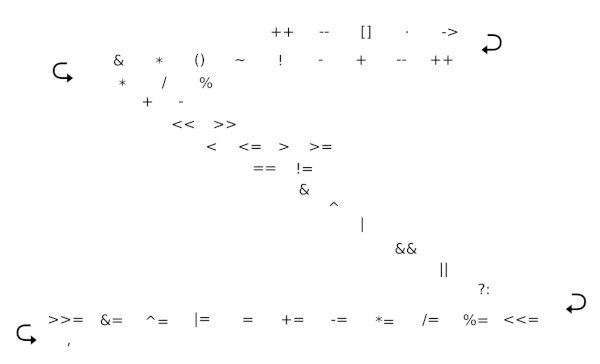
Periodic table of Perl operators
Programming language subsets

{ 0 comments }

I disagree with Linus Torvalds about C++

by John on September 15, 2009

I heard about this note from Linus Torvalds from David Wolever yesterday. Here’s Torvald’s opinion of C++.

C++ is a horrible language. It’s made more horrible by the fact that a lot of substandard programmers use it, to the point where it’s much much easier to generate total and utter crap with it. Quite frankly, even if the choice of C were to do *nothing* but keep the C++ programmers out, that in itself would be a huge reason to use C.

Well, I’m nowhere near as talented a programmer as Linus Torvalds, but I totally disagree with him. If it’s easy to generate crap in a relatively high-level and type-safe language like C++, then it must be child’s play to generate crap in C. It’s not fair to compare world-class C programmers like Torvalds and his peers to average C++ programmers. Either compare the best with the best or compare the average with the average. Comparing the best with the best isn’t very interesting. I imagine gurus like Bjarne Stroustrup and Herb Sutter can write C++ as skillfully as Linus Torvalds writes C, though that is an almost pointless comparison. Comparing average programmers in each language is more important, and I don’t believe C would come out on top in such a comparison.

Torvalds talks about “STL and Boost and other total and utter crap.” A great deal of thought has gone into the STL and to Boost by some very smart people over the course of several years. Their work has been reviewed by countless peers. A typical C or C++ programmer simply will not write anything more efficient or more robust than the methods in these libraries if they decide to roll their own.

Torvalds goes on to say

In other words, the only way to do good, efficient, and system-level and portable C++ ends up to limit yourself to all the things that are basically available in C.

I’ve had the opposite experience. I’d say that anyone wanting to write a large C program ends up reinventing large parts of C++ and doing it poorly. The features added to C to form C++ were added for good reasons. For example, once you’ve allocated and de-allocated C structs a few times, you realize it would be good to have functions to do this allocation and de-allocation. You basically end up re-inventing C++ constructors and destructors. But you end up with something totally sui generis. There’s no compiler support for the conventions you’ve created. No one can read about your home-grown constructors and destructors in a book. And you probably have not thought about as many contingencies as the members of the C++ standards committee have thought of.

I disagree that writing projects in C keeps out inferior C++ programmers who are too lazy to write C. One could as easily argue the opposite, that C is for programmers too lazy to learn C++. Neither argument is fair, but I think there is at least as much validity to the latter as there is to the former. I think there may be a sort of bimodal distribution of C programmer talent: some of the best and some of the worst programmers use C but for different reasons.

I do not claim that C++ is perfect, but I’ve never had any desire to go back to C after I moved to C++ many years ago. I’ll grant that I’m not writing my own operating system, but neither are the vast majority of programmers. For my work, C++ is as low-level as I care to go.

Related posts:

Conservation of complexity
Two perspectives on the design of C++
C++ templates may reduce memory footprint
Porting Visual C++ code to Linux/gcc

{ 67 comments }

Termites and programmers

by John on September 1, 2009

There are more termites in the world than there are elephants. Not only that, the total mass of the world’s elephants is roughly 1/1000 the total mass of the world’s termites. The big, visible animals, the ones that first come to mind, are a small fraction of the total.

Something similar is true of software projects: the big, visible projects, the ones people write about, are a small fraction of the total. Certainly there are more small projects in the world than large projects. And I imagine more programmers in total work on small projects than on large projects. I don’t have any hard numbers on this, and I doubt anyone else does. Most hard numbers come from large, visible projects! Who is going to do a census of all the little one-man projects that go unnoticed?

This post is a continuation of a comment I made as part of the discussion following my blog post on medieval software project management. My contention there was that most projects involve one developer, have no written requirements, and no external testing. That may not be correct, but I imagine it’s closer to the truth than assuming everyone works on projects with a dozen developers, formal requirements documents, and a staff of testers.

The first books on the “right” way to develop software codified the experience gained from working on enormous federally funded software projects. For example, the recommended practice was to spend huge proportion of the total effort in up-front planning. While that made sense when coordinating the efforts of thousands of contractors in the days of punch cards, it doesn’t make as much sense now. The agile software development movement began when people realized that the world had changed and the “best practices” of a previous generation were not optimal for smaller projects and vastly superior hardware.

Agile software development has replaced the best practices of the 1960’s in many organizations. However, there is still a strong tendency to think that small projects should use the same tools and techniques as large, enterprise projects. Most books are written about medium to large projects and many developers worry unnecessarily about scaling up their projects. (”What if I get a million visitors an hour to my web site?” You should be so lucky. Worry about that after it becomes a remote possibility.) Few pundits give advice that scales down, that is, advice appropriate for small projects. I wrote about one exception in a previous post in which Rob Page suggests different methods for projects with a budget of less than $1M and projects with a larger budget.

Related posts:

Million dollar cutoff for software technique
Enterprising software
Medieval software project management

{ 0 comments }