
When I wrote about the harmonic triangle yesterday, I displayed the triangle left-aligned using fixed-width text because that was easier than producing the format you usually see for Pascal’s triangle and related triangles.
    1
    1/2  1/2
    1/3  1/6   1/3
    1/4  1/12  1/12  1/4
    1/5  1/20  1/30  1/20  1/5
    …
I asked Claude to write a LaTeX package to make it easier to create Pascal-like triangles and it did a great job, including handy features I didn’t think to ask for. You can download it here: numtriangle.sty.
I used this package to create the more attractive display below.
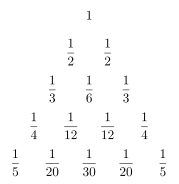
Here’s the LaTeX code that produced the image above.
\documentclass[border=4pt]{standalone}
\usepackage{numtriangle}
\NewTriangle{\Leibniz}{start=1, edges=1/\n, rule=\L - \P, fractions,
  format=\displaystyle, xsep=2.8em, ysep=2.8em}
\begin{document}
\Leibniz[rows=5]
\end{document}
I then compiled the code to an SVG file with the following.
pdflatex leibniz.pdf
pdftocairo -svg leibniz.pdf leibniz.svg
Bell’s triangle is not defined in a way that the LaTeX package supports, but I can produce the triangle by listing the content. I made the triangle left-aligned rather than centered just to show that this can be done.
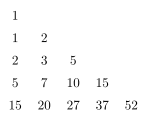
The LaTeX code was the following:
\ListTriangle[shape=left]{
    1; 1, 2; 2, 3, 5; 5, 7, 10, 15; 15, 20, 27, 37, 52}
Here’s a particularly photogenic image, Pascal’s triangle with odd numbers highlighted, showing the Sierpiński triangle pattern.
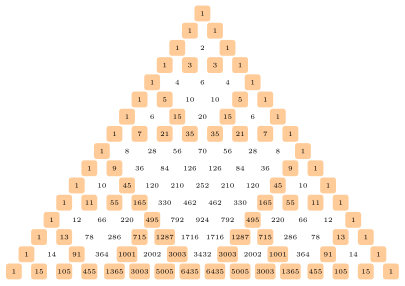
The code to produce the image:
\PascalTriangle[rows=16, mod=2, xsep=1.9em, ysep=1.3em,
  cell style={font=\tiny, minimum size=1.2em},
  highlight style={fill=orange!40}]