
An AI Odyssey, Part 1: Correctness Conundrum

I recently talked with a contact who repeated what he’d heard regarding agentic AI systems—namely, that they can greatly increase productivity in professional financial management tasks. However, I pointed out that though this is true, these tools do not guarantee correctness, so one has to be very careful letting them manage critical assets such as financial data.

It is widely recognized that AI models, even reasoning models and agentic systems, can make mistakes. One example is a case showing that one of the most recent and capable AI models made multiple factual mistakes in drawing together information for a single slide of a presentation.  Sure, people can give examples where agentic systems can perform amazing tasks. But it’s another question as to whether they can always do them reliably. Unfortunately, we do not yet have procedural frameworks that provides reliability guarantees that are comparable to those required in other high-stakes engineering domains.

Many leading researchers have acknowledged that current AI systems have a degree of technical unpredictability that has not been resolved. For example, one has recently said,  “Anyone who has worked with AI models understands that there is a basic unpredictability to them, that in a purely technical way we have not solved.”

What industrial-strength reliability looks like

Manufacturing has the notion of Six Sigma quality, to reduce the level of manufacturing defects to an extremely low level. In computing, the correctness requirements are even higher, sometimes necessitating provable correctness. The Pentium FDIV bug in the 1990s caused actual errors in calculations to occur in the wild, even though the chance of error was supposedly “rare.” These were silent errors that might have occurred undetected in mission critical applications, leading to failure. This being said, the Pentium FDIV error modes were precisely definable, whereas AI models are probabilistic, making it much harder to bound the errors.

Exact correctness is at times considered so important that there is an entire discipline, known as formal verification, to prove specified correctness properties for critical hardware and software systems (for example, the manufacture of computing devices). These methods play a key role in multi-billion dollar industries.

When provable correctness is not available, having at least a rigorous certification process (see here for one effort) is a step in the right direction.

It has long been recognized that reliability is a fundamental challenge in modern AI systems. Despite dramatic advances in capability, strong correctness guarantees remain an open technical problem. The central question is how to build AI systems whose behavior can be bounded, verified, or certified at domain-appropriate levels. Until this is satisfactorily resolved, we should use these incredibly useful tools in smart ways that do not create unnecessary risks.
Shell variable ~-

After writing the previous post, I poked around in the bash shell documentation and found a handy feature I’d never seen before, the shortcut ~-.

I frequently use the command cd - to return to the previous working directory, but didn’t know about ~- as a shotrcut for the shell variable $OLDPWD which contains the name of the previous working directory.

Here’s how I will be using this feature now that I know about it. Fairly often I work in two directories, and moving back and forth between them using cd -, and need to compare files in the two locations. If I have files in both directories with the same name, say notes.org, I can diff them by running

    diff notes.org ~-/notes.org

I was curious why I’d never run into ~- before. Maybe it’s a relatively recent bash feature? No, it’s been there since bash was released in 1989. The feature was part of C shell before that, though not part of Bourne shell.

Working with file extensions in bash scripts

I’ve never been good at shell scripting. I’d much rather write scripts in a general purpose language like Python. But occasionally a shell script can do something so simply that it’s worth writing a shell script.

Sometimes a shell scripting feature is terse and cryptic precisely because it solves a common problem succinctly. One example of this is working with file extensions.

For example, maybe you have a script that takes a source file name like foo.java and needs to do something with the class file foo.class. In my case, I had a script that takes a La TeX file name and needs to create the corresponding DVI and SVG file names.

Here’s a little script to create an SVG file from a LaTeX file.

    #!/bin/bash

    latex "$1"
    dvisvgm --no-fonts "${1%.tex}.dvi" -o "${1%.tex}.svg"

The pattern ${parameter%word} is a bash shell parameter expansion that removes the shortest match to the pattern word from the end of the expansion of parameter. So if $1 equals foo.tex, then

    ${1%.tex}

evaluates to

    foo

and so

${1%.tex}.dvi

and

${1%.tex}.svg

expand to foo.dvi and foo.svg.

You can get much fancier with shell parameter expansions if you’d like. See the documentation here.

Bitcoin mining difficulty

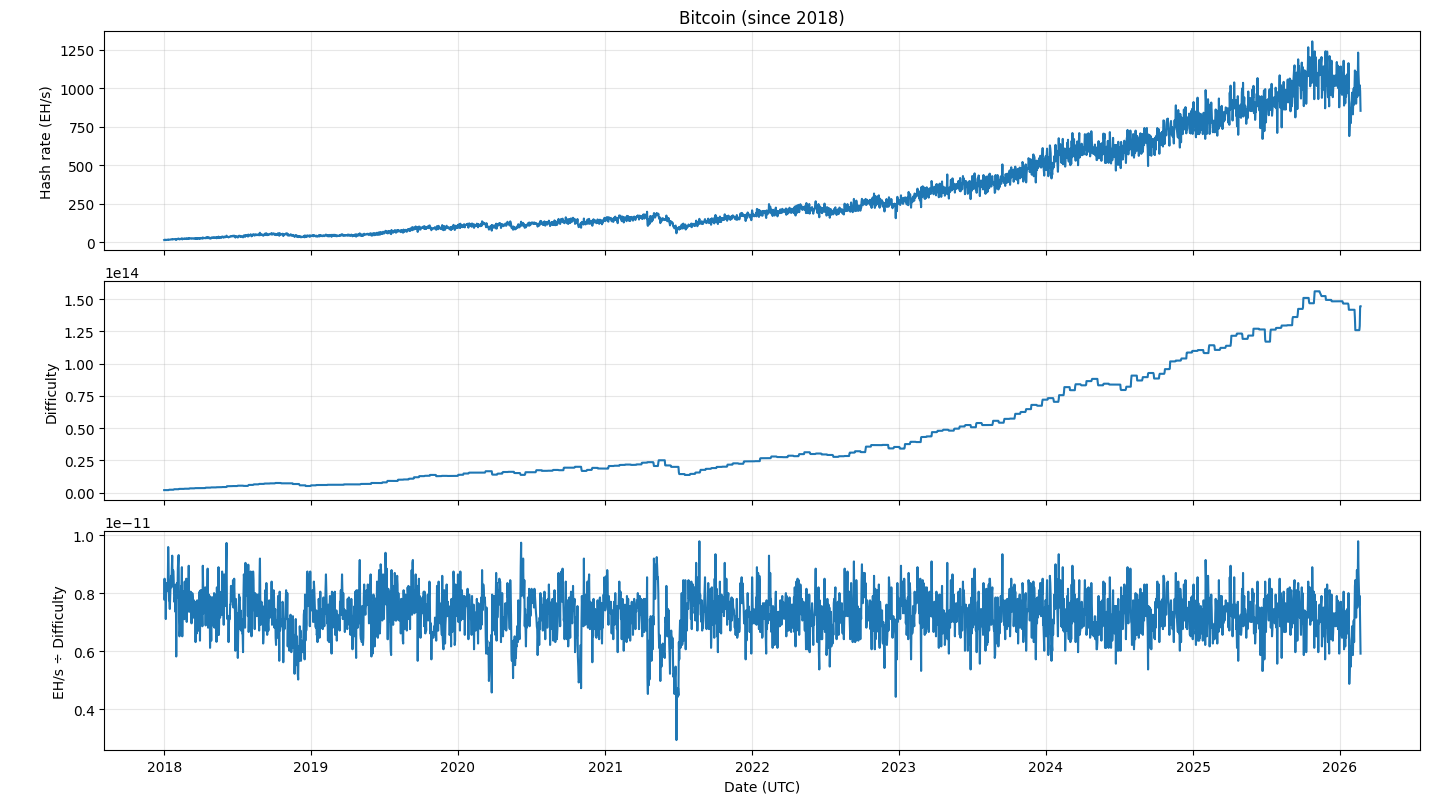
The previous post looked at the Bitcoin network hash rate, currently around one zettahash per second, i.e. 1021 hashes per second. The difficulty of mining a Bitcoin block adjusts over time to keep the rate of block production relatively constant, around one block every 10 minutes. The plot below shows this in action.

Bitcoin hash rate, difficulty, and ratio of the two

Notice the difficulty graph is more quantized than the hash rate graph. This is because the difficulty changes every 2,016 blocks, or about every two weeks. The number 2016 was chosen to be the number of blocks that would be produced in two weeks if every block took exactly 10 minutes to create.

The ratio of the hash rate to difficulty is basically constant with noise. The noticeable dip in mid 2021 was due to China cracking down on Bitcoin mining. This caused the hash rate to drop suddenly, and it took a while for the difficulty level to be adjusted accordingly.

Mining difficulty

At the current difficulty level, how many hashes would it take to mine a Bitcoin block if there were no competition? How does this compare to the number of hashes the network computes during this time?

To answer these questions, we have to back up a bit. The current mining difficulty is around 1014, but what does that mean?

The original Bitcoin mining task was to produce a hash [1] with 32 leading zeros. On average, this would take 232 attempts. Mining difficulty is defined so that the original mining difficult was 1 and current mining difficulty is proportional to the expected number of hashes needed. So a difficulty of around 1014 means that the expected number of hashes is around

1014 × 232 = 4.3 × 10²³.

At one zetahash per second, the number of hashes computed by the entire network over a 10 minute interval would be

1021 × 60 × 10 = 6 × 10²³.

So the number of hashes computed by the entire network is only about 40% greater than what would be necessary to mine a block without competition.

Related posts

[1] The hash function used in Bitcoin’s proof of work is double SHA256, i.e. the Bitcoin hash of x is SHA256( SHA256( x ) ). So a single Bitcoin hash consists of two applications of the SHA256 hash function.

10,000,000th Fibonacci number

I’ve written a couple times about Fibonacci numbers and certificates. Here the certificate is auxiliary data that makes it faster to confirm that the original calculation was correct.

This post puts some timing numbers to this.

I calculated the 10 millionth Fibonacci number using code from this post.

n = 10_000_000    
F = fib_mpmath(n)

This took 150.3 seconds.

As I’ve discussed before, a number f is a Fibonacci number if and only if 5f² ± 4 is a square r². And for the nth Fibonacci number, we can take ± to be positive if n is even and negative if n is odd.

I computed the certificate r with

r = isqrt(5*F**2 + 4 - 8*(n%2))

and this took 65.2 seconds.

Verifying that F is correct with

n = abs(5*F**2 - r**2)
assert(n == 4)

took 3.3 seconds.

About certificates

So in total it took 68.5 seconds to verify that F was correct. But if someone had pre-computed r and handed me F and r I could use r to verify the correctness of F in 3.3 seconds, about 2% of the time it took to compute F.

Sometimes you can get a certificate of correctness for free because it is a byproduct of the problem you’re solving. Other times computing the certificate takes a substantial amount of work. Here computing F and r took about 40% more work than just computing F.

What’s not typical about this example is that the solution provider carries out exactly the same process to create the certificate that someone receiving the solution without a certificate would do. Typically, even if the certificate isn’t free, it does come at a “discount,” i.e. the problem solver could compute the certificate more efficiently than someone given only the solution.

Proving you have the right Fibonacci number

Now suppose I have you the number F above and claim that it is the 10,000,000th Fibonacci number. You carry out the calculations above and say “OK, you’ve convinced me that F is a Fibonacci number, but how do I know it’s the 10,000,000th Fibonacci number?

The 10,000,000th Fibonacci number has 2,089,877 digits. That’s almost enough information to verify that a Fibonacci number is indeed the 10,000,000th Fibonacci number. The log base 10 of the nth Fibonacci number is very nearly

n log10 φ − 0.5 log10 5

based on Binet’s formula. From this we can determine that the nth Fibonacci number has 2,089,877 digits if n = 10,000,000 + k where k equals 0, 1, 2, or 3.

Because

log10 F10,000,000 = 2089876.053014785

and

100.053014785 = 1.129834377783962

we know that the first few digits of F10,000,000 are 11298…. If I give you a 2,089,877 digits that you can prove to be a Fibonacci number, and its first digit is 1, then you know it’s the 10,000,000th Fibonacci number.

You could also verify the number by looking at the last digit. As I wrote about here, the last digits of Fibonacci number have a period of 60. That means the last digit of the 10,000,000th Fibonacci number is the same as the last digit of the 40th Fibonacci number, which is 5. That is enough to rule out the other three possible Fibonacci numbers with 2,089,877 digits.

Computing big, certified Fibonacci numbers

I’ve written before about computing big Fibonacci numbers, and about creating a certificate to verify a Fibonacci number has been calculated correctly. This post will revisit both, giving a different approach to computing big Fibonacci numbers that produces a certificate along the way.

As I’ve said before, I’m not aware of any practical reason to compute large Fibonacci numbers. However, the process illustrates techniques that are practical for other problems.

The fastest way to compute the nth Fibonacci number for sufficiently large n is Binet’s formula:

Fn = round( φn / √5 )

where φ is the golden ratio. The point where n is “sufficiently large” depends on your hardware and software, but in my experience I found the crossover to be somewhere 1,000 and 10,000.

The problem with Binet’s formula is that it requires extended precision floating point math. You need extra guard digits to make sure the integer part of your result is entirely correct. How many guard digits you’ll need isn’t obvious a priori. This post gave a way of detecting errors, and it could be turned into a method for correcting errors.

But how do we know an error didn’t slip by undetected? This question brings us back to the idea of certifying a Fibonacci number. A number f Fibonacci number if and only if one of 5f2 ± 4 is a perfect square.

Binet’s formula, implemented in finite precision, takes a positive integer n and gives us a number f that is approximately the nth Fibonacci number. Even in low-precision arithmetic, the relative error in the computation is small. And because the ratio of consecutive Fibonacci numbers is approximately φ, an approximation to Fn is far from the Fibonacci numbers Fn − 1 and Fn + 1. So the closest Fibonacci number to an approximation of Fn is exactly Fn.

Now if f is approximately Fn, then 5f2 is approximately a square. Find the integer r minimizing  |5f2r²|. In Python you could do this with the isqrt function. Then either r² + 4 or r² − 4 is divisible by 5. You can know which one by looking at r² mod 5. Whichever one is, divide it by 5 and you have the square of Fn. You can take the square root exactly, in integer arithmetic, and you have Fn. Furthermore, the number r that you computed along the way is the certificate of the calculation of Fn.

Wagon’s algorithm in Python

The last three posts have been about Stan Wagon’s algorithm for finding x and y satisfying

x² + y² = p

where p is an odd prime.

The first post in the series gives Gauss’ formula for a solution, but shows why it is impractical for large p. The bottom of this post introduces Wagon’s algorithm and says that it requires two things: finding a quadratic non-residue mod p and a variation on the Euclidean algorithm.

The next post shows how to find a quadratic non-residue.

The reason Wagon requires a non-residue is because he needs to find a square root of −1 mod p. The previous post showed how that’s done.

In this post we will complete Wagon’s algorithm by writing the modified version of the euclidean algorithm.

Suppose p is an odd prime, and we’ve found x such that x² = −1 mod p as in the previous posts. The last step in Wagon’s algorithm is to apply the Euclidean algorithm to x and p and stop when the numbers are both less than √p.

When we’re working with large integers, how do we find square roots? Maybe p and even √p are too big to represent as a floating point number, so we can’t just apply the sqrt function. Maybe p is less than the largest floating point number (around 10308) but the sqrt function doesn’t have enough precision. Floats only have 53 bits of precision, so an integer larger than 253 cannot necessarily be represented entirely accurately.

The solution is to use the isqrt function, introduced in Python 3.8. It returns the largest integer less than the square root of its argument.

Now we have everything necessary to finish implementing Wagon’s algorithm.

from sympy import legendre_symbol, nextprime
from math import isqrt

def find_nonresidue(p):
    q = 2
    while legendre_symbol(q, p) == 1:
        q = nextprime(q)
    return q

def my_euclidean_algorithm(a, b, stop):
    while a > stop:
        a, b = b, a % b
    return (a, b)

def find_ab(p):
    assert(p % 4 == 1)
    k = p // 4
    c = find_nonresidue(p)
    x = pow(c, k, p)
    return my_euclidean_algorithm(p, x, isqrt(p))

Let’s use this to find a and b such that x² + y² = p where p = 2255 − 19.

>>> a, b = find_ab(p := 2**255 - 19)
>>> a
230614434303103947632580767254119327050
>>> b
68651491678749784955913861047835464643
>>> a**2 + b**2 - p
0

Finis.

Finding a non-square mod p

The previous post briefly mentioned Stan Wagon’s algorithm for expressing an odd prime p as a sum of two squares when it is possible (i.e. when p = 1 mod 4). Wagon’s algorithm requires first finding a non-square mod p, i.e. a number c such that cd² mod p for any d in 1, 2, 3, … p − 1.

Wagon recommends searching for c by testing consecutive primes q as candidates. You can test whether a number q is a square mod p by computing the Legendre symbol, which is implemented in SymPy as legendre_symbol(q, p). This returns 1 if q is a quadratic residue mod p and −1 if it is not.

Here’s Python code for doing the search.

from sympy import *

def find_nonresidue(p):
    q = 2
    while legendre_symbol(q, p) == 1:
        q = nextprime(q)
    return q

Let’s start with p = 2255 − 19. This prime comes up often in cryptography, such as Curve25519. Now p = 1 mod 4, so Wagon’s algorithm applies.

The code above returns 2, i.e. the first thing we tried worked. That was kinda disappointingly easy.

Here’s another large prime used in cryptography, in the NIST curve P-384.

p = 2384 − 2128 − 296 + 232 − 1

For this value of p, find_nonresidue(p) returns 19.

Why test prime as candidates for non-residues? You could pick candidates at random, and there’s a probability 1/2 that any candidate will work, since half the integers less than p are residues and half are non-residues. It’s very likely that you’d find a solution quickly, but it’s not guaranteed. In principle, you could try a thousand candidates before one works, though that’s vanishingly unlikely. If you test consecutive primes, there is a theoretical limit on how many guesses you need to make, if the Extended Riemann Hypothesis is true.

The next post explains why we wanted to find a non-residue.

Aligning one matrix with another

Suppose you have two n × n matrices, A and B, and you would like to find a rotation matrix Ω that lines up B with A. That is, you’d like to find Ω such that

A = ΩB.

This is asking too much, except in the trivial case of A and B being 1 × 1 matrices. You could view the matrix equation above as a set of n² equations in real numbers, but the space of orthogonal matrices only has n(n − 1) degrees of freedom [1].

When an equation doesn’t have an exact solution, the next best thing is to get as close as possible to a solution, typically in a least squares sense. The orthogonal Procrustes problem is to find an orthogonal matrix Ω minimizing the distance between A and ΩB That is, we want to minimize

|| A − ΩB ||

subject to the constraint that Ω is orthogonal. The matrix norm used in this problem is the Frobenius norm, the sum of the squares of the matrix entries. The Frobenius norm is the 2-norm if we straighten the matrices into vectors of dimension n².

Peter Schönemann found a solution to the orthogonal Procrustes problem in 1964. His solution involves singular value decomposition (SVD). This shouldn’t be surprising since SVD solves the problem of finding the closest thing to an inverse of an non-invertible matrix. (More on that here.)

Schönemann’s solution is to set MABT and find its singular value decomposition

M = UΣVT.

Then

Ω = UVT.

Python code

The following code illustrates solving the orthogonal Procrustes problem for random matrices.

import numpy as np

n = 3

# Generate random n x n matrices A and B
rng = np.random.default_rng(seed=20260211) 
A = rng.standard_normal((n, n))
B = rng.standard_normal((n, n))

# Compute M = A * B^T
M = A @ B.T

# SVD: M = U * Sigma * V^T
U, s, Vt = np.linalg.svd(M, full_matrices=False)

# R = U * V^T
R = U @ Vt

# Verify that R * R^T is very nearly the identity matrix
print("||R^T R - I||_F =", np.linalg.norm(R.T @ R - np.eye(n), ord="fro"))

In this example the Frobenius norm between RRT and I is 4 × 10⁻¹⁶, so essentially RRT = I to machine precision.

Related posts

[1] Every column of an orthogonal matrix Ω must have length 1, so that gives n constraints. Furthermore, each pair of columns must be orthogonal, which gives n choose 2 more constraints. We start with Ω having n² degrees of freedom, but then remove n and then n(n − 1)/2 degrees of freedom.

n² − nn(n − 1)/2 = n(n − 1)/2

Computing large Fibonacci numbers

The previous post discussed two ways to compute the nth Fibonacci number. The first is to compute all the Fibonacci numbers up to the nth iteratively using the defining property of Fibonacci numbers

Fn + 2 = Fn + Fn + 1

with extended integer arithmetic.

The second approach is to use Binet’s formula

Fn = round( φn / √ 5 )

where φ is the golden ratio.

It’s not clear which approach is more efficient. You might naively say that the iterative approach has run time O(n) while Binet’s formula is O(1). That doesn’t take into account how much work goes into each step, but it does suggest that eventually Binet wins.

The relative efficiency of each algorithm depends on how it is implemented. In this post I will compare using Python’s integer arithmetic and the mpmath library for floating point. Here’s my code for both methods.

from math import log10
import mpmath as mp

def fib_iterate(n):
    a, b = 0, 1
    for _ in range(n):
        a, b = b, a + b
    return a

def digits_needed(n):

    phi = (1 + 5**0.5) / 2
    return int(n*log10(phi) - 0.5*log10(5)) + 1

def fib_mpmath(n, guard_digits=30):

    digits = digits_needed(n)

    # Set decimal digits of precision
    mp.mp.dps = digits + guard_digits

    sqrt5 = mp.sqrt(5)
    phi = (1 + sqrt5) / 2
    x = (phi ** n) / sqrt5

    return int(mp.nint(x))

Next, here’s some code to compare the run times.

def compare(n):
    
    start = time.perf_counter()
    x = fib_iterate(n)
    elapsed = time.perf_counter() - start
    print(elapsed)

    start = time.perf_counter()
    y = fib_mpmath(n)
    elapsed = time.perf_counter() - start
    print(elapsed)

    if (x != y):
        print("Methods produced different results.")

This code shows that the iterate approach is faster for n = 1,000 but Binet’s method is faster for n = 10,000.

>>> compare(1_000)
0.0002502090001144097
0.0009207079999669077
>>> compare(10_000)
0.0036547919999065925
0.002145750000181579

For larger n, the efficiency advantage of Binet’s formula becomes more apparent.

>>> compare(1_000_000)
11.169050417000108
2.0719056249999994

Guard digits and correctness

There is one unsettling problem with the function fib_mpmath above: how many guard digits do you need? To compute a number correctly to 100 significant figures, for example, requires more than 100 digits of working precision. How many more? It depends on the calculation. What about our calculation?

If we compute the 10,000th Fibonacci number using fib_mpmath(10_000, 2), i.e. with 2 guard digits, we get a result that is incorrect in the last digit. To compute the 1,000,000th Fibonacci number correctly, we need 5 guard digits.

We don’t need many guard digits, but we’re guessing at how many we need. How might we test whether we’ve guessed correctly? One way would be to compute the result using fib_iterate and compare results, but that defeats the purpose of using the more efficient fib_mpmath.

If floating point calculations produce an incorrect result, the error is likely to be in the least significant digits. If we knew that the last digit was correct, that would give us more confidence that all the digits are correct. More generally, we could test the result mod m. I discussed Fibonacci numbers mod m in this post.

When m = 10, the last digits of the Fibonacci numbers have a cycle of 60. So the Fibonacci numbers with index n and with index n mod 60 should be the same.

The post I just mentioned links to a paper by Niederreiter that says the Fibonacci numbers ore evenly distributed mod m if and only if m is a power of 5, in which case the cycle length is 4m.

The following code could be used as a sanity check on the result of fig_mpmath.

def mod_check(n, Fn):
    k = 3
    base = 5**k
    period = 4*base
    return Fn % base == fib_iterate(n % period) % base

With k = 3, we are checking the result of our calculation mod 125. It is unlikely that an incorrect result would be correct mod 125. It’s hard to say just how unlikely. Naively we could say there’s 1 chance in 125, but that ignores the fact that the errors are most likely in the least significant bits. The chances of an incorrect result being correct mod 125 would be much less than 1 in 125. For more assurance you could use a larger power of 5.