A valid character to represent an invalid character

U+FFFD REPLACEMENT CHARACTER

You may have seen a web page with the symbol � scattered throughout the text, especially in older web pages. What is this symbol and why does it appear unexpected?

The symbol we’re discussing is a bit of a paradox. It’s the (valid) Unicode character to represent an invalid Unicode character. If you just read the first sentence of this post, without inspecting the code point values, you can’t tell whether the symbol appears because I’ve made a mistake, or whether I’ve deliberately included the symbol.

The symbol in question is U+FFFD, named REPLACEMENT CHARACTER, a perfectly valid Unicode character. But unlike this post, you’re most likely to see it when the author did not intend for you to see it. What’s going on?

It all has to do with character encoding.

If all you want to do is represent Roman letters and common punctuation marks, and control characters, ASCII is fine. There are 128 ASCII characters, so they fit into a single 8-bit byte. But as soon as you want to write façade, jalapeño, or Gödel you have a problem. And of course you have a bigger problem if your language doesn’t use the Roman alphabet at all.

ASCII wastes one bit per byte, so naturally people wanted to take advantage of that extra bit to represent additional characters, such as the ç, ñ, and ö above. One popular way of doing this was described in the standard ISO 8859-1.

Of course there are other ways of encoding characters. If your language is Russian or Hebrew or Chinese, you’re no happier with ISO 8859-1 than you are with ASCII.

Enter Unicode. Let’s represent all the word’s alphabets (and ideograms and common symbols and …) in a single system. Great idea, though there are a mind-boggling number of details to work out. Even so, once you’ve assigned a number to every symbol that you care about, there’s still more work to do.

You could represent every character with two bytes. Now you can represent 65,536 characters. That’s too much and too little. If you want to represent text that is essentially made of Roman letters plus occasional exotic characters, using two bytes per letter makes the text 100% larger.

And while 65,536 sounds like a lot of characters, it’s not enough to represent every Chinese character, much less all the characters in other languages. Turns out we need four bytes to do what Unicode was intended to do.

So now we have to deal with encodings. UTF-8 is a brilliant solution to this problem. It can handle all Unicode characters, but if text is just ASCII, it won’t be any longer: ASCII is a valid UTF-8 encoding of the subset of Unicode that belonged to ASCII.

But there were other systems before Unicode, like ISO 8859-1, and if your file is encoded as ISO 8859-1, but a web browser thinks its UTF-8 encoded Unicode, some characters could be invalid. Browsers will use the character � as a replacement for invalid text that it could not otherwise display. That’s probably what’s going on when you see �.

See the article on How UTF-8 works to understand why some characters are not just a different character than intended but illegal UTF-8 byte sequences.
Cross-platform way to enter Unicode characters

The previous post describes the hoops I jumped through to enter Unicode characters on a Mac. Here’s a script to run from the command line that will copy Unicode characters to the system clipboard. It runs anywhere the Python module pyperclip runs.

    #!/usr/bin/env python3

    import sys
    import pyperclip

    cp = sys.argv[1]
    ch = eval(f"chr(0x{cp})")
    print(ch)
    pyperclip.copy(ch)

I called this script U so I could type

    U 03c0

at the command line, for example, it would print π to the command line and also copy it to the clipboard.

Unlike the MacOS solution in the previous post, this works for any Unicode value, i.e. for code points above FFFF.

On my Linux box I had to install xclip before pyperclip would work.

Double-struck capital letters

I’ve needed to use double-struck capital letters lately, also called blackboard bold. There are a few quirks in how they are represented in Unicode and in HTML entities, so I’m leaving some notes for myself here and for anyone else who might need to look this up.

Unicode

The double-struck capital letters are split into two blocks for historical reasons. The double-struck capital letters used most often in math — ℂ, ℍ, ℕ, ℙ, ℚ, ℝ, ℤ — are located in the U+21XX range, while the rest are in the U+1D5XX range.

Low characters

The letters in the U+21XX range were the first to be included in the Unicode standard. There’s no significance to the code points.

ℂ U+2102
ℍ U+210D 
ℕ U+2115
ℙ U+2119 
ℚ U+211A
ℝ U+211D
ℤ U+2124 

The names, however are consistent. The official name of ℂ is

DOUBLE-STRUCK CAPITAL C

and the rest are analogous.

High characters

The code point for double-struck capital A is U+1D538 and the rest are in alphabetical order: the nth letter of the English alphabet has code point

0x1D537 + n.

However, the codes corresponding to the letters in the low range are missing. For example, U+1D53A, the code that would logically be the code for ℂ, is unused so as not to duplicate the codes in the low range.

The official names of these characters are

MATHEMATICAL DOUBLE-STRUCK CAPITAL C

and so forth. Note the “MATHEMTICAL” prefix that the letters in the low range do not have.

Incidentally, X is the 24th letter, so the new logo for Twitter has code point U+1D54F.

HTML Entities

All double-struck letters have HTML shortcuts of the form *opf; where * is the letter, whether capital or lower case. For example, is 𝔸 and is 𝕒.

The letters with lower Unicode values also have semantic entities as well.

ℂ ℂ ℂ
ℍ ℍ ℍ
ℕ ℕ ℕ
ℙ ℙ ℙ
ℚ ℚ ℚ
ℝ ℝ ℝ
ℤ ℤ ℤ

LaTeX

The LaTeX command for any double-struck capital letter is \mathbb{}. This only applies to capital letters.

Python

Here’s Python code to illustrate the discussion of Unicode values above.

def doublestrike(ch):

    exceptions = {
        'C' : 0x2102,
        'H' : 0x210D,
        'N' : 0x2115,
        'P' : 0x2119,
        'Q' : 0x211A,
        'R' : 0x211D,
        'Z' : 0x2124
    }
    if ch in exceptions:
        codepoint = exceptions[ch]
    else:
        codepoint = 0x1D538 + ord(ch) - ord('A')
    print(chr(codepoint), f"U+{format(codepoint, 'X')}")

for n in range(ord('A'), ord('Z')+1):
    doublestrike(chr(n))

Russian transliteration hack

I mentioned in the previous post that I had been poking around in HTML entities and noticed symbols for Fourier transforms and such. I also noticed HTML entities for Cyrillic letters. These entities have the form

& + transliteration + cy;.

For example, the Cyrillic letter П is based on the Greek letter Π and its closest English counterpart is P, and its HTML entity is П.

The Cyrillic letter Р has HTML entity &Rpcy; and not П because although it looks like an English P, it sounds more like an English R.

Just as a hack, I decided to write code to transliterate Russian text by converting letters to their HTML entities, then chopping off the initial & and the final cy;.

I don’t speak Russian, but according to Google Translate, the Russian translation of “Hello world” is “Привет, мир.”

Here’s my hello-world program for transliterating Russian.

    from bs4.dammit import EntitySubstitution

    def transliterate(ch):
        entity = escaper.substitute_html(ch)[1:]
        return entity[:-3]
    
    a = [transliterate(c) for c in "Привет, мир."]
    print(" ".join(a))

This prints

P r i v ie t m i r

Here’s what I get trying to transliterate Chebyshev’s native name Пафну́тий Льво́вич Чебышёв.

P a f n u t i j L soft v o v i ch CH ie b y sh io v

I put a space between letters because of possible outputs like “soft v” above.

This was just a fun hack. Here’s what I’d get if I used software intended to be used for transliteration.

    import unidecode

    for x in ["Привет, мир", "Пафну́тий Льво́вич Чебышёв"]:
        print(unidecode.unidecode(x))

This produces

Privet, mir
Pafnutii L’vovich Chebyshiov

The results are similar.

Related posts

Symbols for transforms

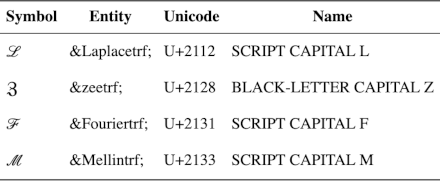
I was looking through HTML entities and ran across ℱ. I searched for all entities ending in trf; and also found ℳ, ℒ, and ℨ.

Apparently “trf” stands “transform” and these symbols are intended to be used to represent the Fourier transform, Mellin transform, Laplace transform, and z-transform.

You would not know from the Unicode names that these symbols are intended to be used for transforms. For example, U+2131 has Unicode name SCRIPT CAPITAL F. But the HTML entity ℱ suggests how the symbol could be used.

These are not the symbols I’d use for these transforms if I had access to LaTeX. I’d use {\cal F} for the Fourier transform, for example. But if I were writing about math and restricted to Unicode symbols, as I am on Twitter, I might use these symbols. I could imagine, for example, using ℒ for Laplace transform on @AnalysisFact.

Here’s a table with more on the four transform symbols that have HTML entities.

| ℒ      | ℒ | U+2112  | SCRIPT CAPITAL L       |
| ℨ      | ℨ     | U+2128  | BLACK-LETTER CAPITAL Z |
| ℱ      | ℱ | U+2131  | SCRIPT CAPITAL F       |
| ℳ      | ℳ  | U+2133  | SCRIPT CAPITAL M       |

Related posts

How to memorize Unicode codepoints

At the end of each month I write a newsletter highlighting the most popular posts of that month. When I looked back at my traffic stats to write this month’s newsletter I noticed that a post I wrote last year about how to memorize the ASCII table continues to be popular. This post is a follow up, how to memorize Unicode values.

Memorizing all 128 ASCII values is doable. Memorizing all Unicode values would be insurmountable. There are nearly 150,000 Unicode characters at the moment, and the list grows over time. But knowing a few Unicode characters is handy. I often need to insert a π symbol, for example, and so I made an effort to remember its Unicode value, U+03C0.

There are convenient ways of inserting common non-ASCII characters without knowing their Unicode values, but these offer a limited range of characters and they work differently in different environments. Inserting Unicode values gives you access to more characters in more environments.

As with ASCII, you can memorize the Unicode value of a symbol by associating an image with a number and associating that image with the symbol. The most common way to associate an image with a number is the Major system. As with everything else, the Major system becomes easier with practice.

However, Unicode presents a couple challenges. First, Unicode codepoints are nearly always written in hexadecimal, and so you’ll run into the letters A through F as well as digits. Second, Unicode codepoints are four hex digits long (or five outside the Basic Multilingual Plane.) We’ll address both of these difficulties shortly.

It may not seem worthwhile to go to the effort of encoding and decoding numbers like this, but it scales well. Brute force is fine for small amounts of data and short-term memory, but image association works much better for large amounts of data and long-term memory.

Unicode is organized into blocks of related characters. For example, U+22xx are math symbols and U+26xx are miscellaneous symbols. If you know what block a symbols is in, you only need to remember the last two hex digits.

You can convert a pair of hex digits to decimal by changing bases. For example, you could convert the C0 in U+03C0 to 192. But this is a moderately difficult mental calculation.

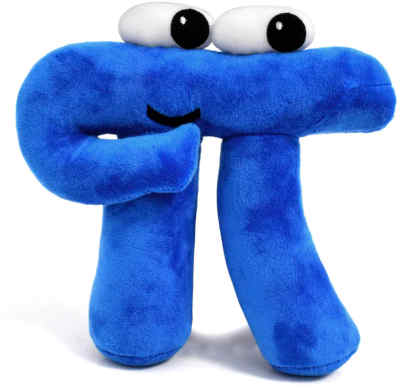
An easier approach would be to leave hex digits alone that correspond to decimal digits, reduce hex digits A through F mod 10, and tack on an extra digit to disambiguate. Stick on a 0, 1, 2, or 3 according to whether no digits, the first digit, the second digit, or both digits had been reduced mod 10. See this page for details. With this system, C0 becomes 201. You could encode 201 as “nest” using the Major system, and imagine a π sitting in a nest, maybe something like the 3Blue1Brown plushie.

3Blue1Brown plushieFor another example, ♕ (U+2655), is the symbol for the white queen in chess. You might think of the White Queen from The Lion, the Witch, and the Wardrobe [2] and associate her with the hex number 0x55. If you convert 0x55 to decimal, you get 85, which you could associate with the Eiffel Tower using the Major system. So maybe imagine the White Queen driving her sleigh under the Eiffel Tower. If you convert 0x55 to 550 as suggested here, you might imagine her driving through a field of lilies.

Often Unicode characters are arranged consecutively in a logical sequence so you can compute the value of the rest of the sequence from knowing the value of the first element. Alphabets are arranged in alphabetical order (mostly [1]), symbols for Roman numerals are arranged in numerical order, symbols for chess pieces are arrange in an order that would make sense to chess players, etc.

[1] There are a few exceptions such as Cyrillic Ё and a gap in Greek capital letters.

[2] She’s not really a queen, but she thinks of herself as a queen. See the book for details.

Symbols for angles

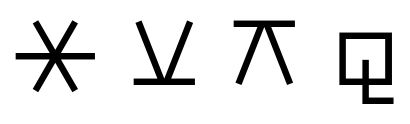
I was looking around in the Unicode block for miscellaneous symbols, U+2600, after I needed to look something up, and noticed there are four astrological symbols for angles: ⚹, ⚺, ⚻, and ⚼.

⚹ ⚺ ⚻ ⚼

These symbols are mysterious at first glance but all make sense in hindsight as I’ll explain below.

Sextile

The first symbol, ⚹, U+26B9, is self-explanatory.  It is made of six 60° angles and is called a sextile after the Latin word for six.

Semisextile

The second symbol, ⚺, U+26BA, is less obvious, though the name is obvious: semisextile is the top half of a sextile, so it represents an angle half as wide.

The symbol looks like ⊻, U+22BB, the logic symbol for XOR (exclusive or), but is unrelated.

Quincunx

The third symbol, ⚻, U+26BB, represents an angle of 150°, the supplementary angle of 30°. Turning the symbol for 30° upside down represents taking the supplementary angle.

The symbol looks like ⊼, U+22BC, the logic symbol for NAND (not and), but is unrelated.

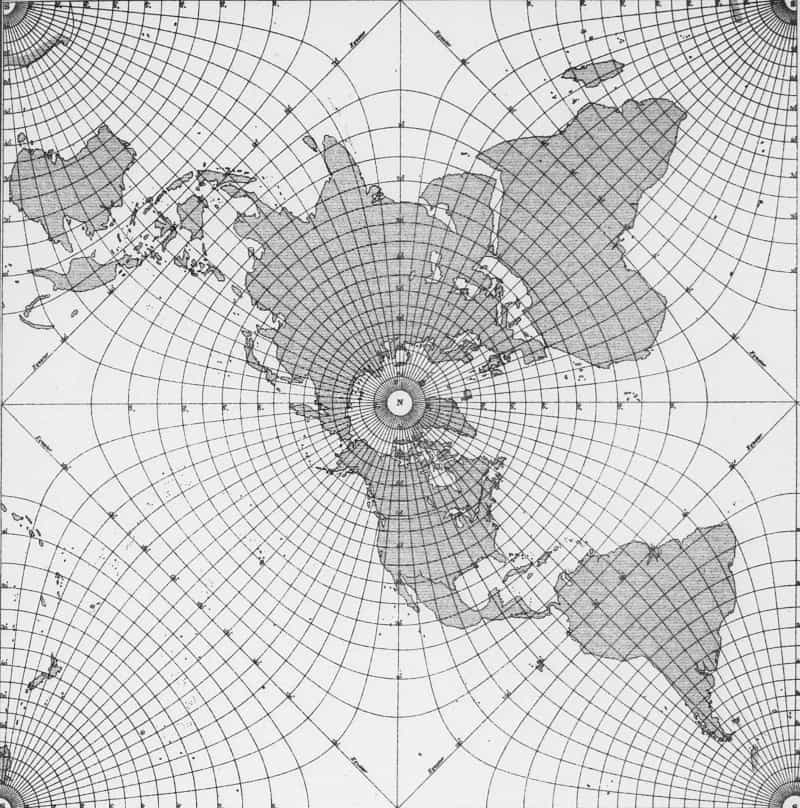
I’ve run into the name quincunx before but not the symbol. Last fall I wrote a post about conformal mapping that mentions the “Peirce quincuncial projection” created by Charles Sanders Peirce using conformal mapping.

Charles Sanders Peirce's quincuncial project
Because the projection was created using conformal mapping, the projection is angle-preserving.

The name of the projection comes from another use of the term quincunx, meaning the pattern of dots on the 5 side of a die.

Sesquiquadrate

The final symbol, ⚼, U+26BC, represents an angle of 135°. A little thought reveals the reason for the symbol and its name. The symbol is a square and half a square, representing a right angle plus half a right angle. The Latin prefix sesqui- means one and a half. For example, a sesquicentennial is a 150th anniversary.

Unicode arrows: math versus emoji

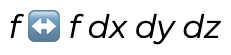
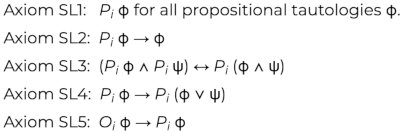
I used the character ↔︎︎ (U+2194) in a blog post recently and once again got bit by the giant pawn problem. That’s my name for when a character intended to be rendered as text is surprisingly rendered as an emoji. I saw

f (emoji <->) f dx dy dz

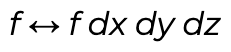
when what I intended was

f <-> f dx dy dz

I ran into the same problem a while back in my post on modal logic and security. The page contained

when I intended

This example is more surprising because → (U+2192) is rendered as text while ↔︎ (U+2194) is rendered as an image. This seems capricious. Why are some symbols rendered as text while other closely-related symbols are not? The reason is that some symbols are interpreted as emoji and some are not. You can find a full list of text characters that might be hijacked as emoji here.

One way to fix this problem is to use the Unicode “variation selector” U+FE0E to tell browsers that you’d like your character interpreted as text. You can also use the variation selector U+FE0F if you really do want a character displayed as an emoji. See this post for details.

(I use U+FE0E several times in this post. Hopefully your browser or RSS reader is rendering it correctly. If it isn’t, please let me know.)

Update: This post looks terrible in the RSS reader on my phone because the reader ignores the variation selectors. See the comments for a screenshot. It renders as intended in my browser, desktop or mobile.

It’s not always convenient or even possible to use variation selectors, and in that case you can simply use different symbols.

Here are four Alternatives to ↔︎ (U+2194):

  • ⟷ (U+27F7)
  • ⇔ (U+21D4)
  • ⟺ (U+27FA)
  • ⇆ (U+21C6)

There is no risk of these characters being interpreted as emoji, and their intent may be clearer. In the two examples above, I used a double-headed arrow to mean two different things.

In the first example I wanted to convey that the Hodge operator takes the left side to the right and the right side to the left. Maybe ⇆ (U+21C6) would have been a better choice. In the second example, maybe it would have been clearer if I had used ⇒ (U+21D2) and ⇔ (U+21D4) rather than → (U+2192) and ↔︎ (U+2194).

Another math symbol that is unfortunately turned into an emoji is ↪︎ (U+21AA). In TeX this is \hookrightarrow. I used this symbol quite a bit in grad school to indicate that one space embeds in another. I don’t know of a good alternative to this one. You could use ⤷ (U+2937), though this looks kinda odd.

Arabic numerals and numerals that are Arabic

The characters 0, 1, 2, 3, 4, 5, 6, 7, 8, and 9 are called Arabic numerals, but there are a lot of other numerals that are Arabic.

I discovered this when reading the documentation on Perl regular expressions, perlre. Here’s the excerpt from that page that caught my eye.

Many scripts have their own sets of digits equivalent to the Western 0 through 9 ones. A few, such as Arabic, have more than one set. For a string to be considered a script run, all digits in it must come from the same set of ten, as determined by the first digit encountered.

Emphasis added.

I took some code I’d written for previous posts on Unicode numbers and modified it to search the range of Arabic Unicode characters and report all characters that represent 0 through 9.

from unicodedata import numeric, name

a = set(range(0x00600, 0x006FF+1)) | \
    set(range(0x00750, 0x0077F+1)) | \
    set(range(0x008A0, 0x008FF+1)) | \
    set(range(0x00870, 0x0089F+1)) | \
    set(range(0x0FB50, 0x0FDFF+1)) | \
    set(range(0x0FE70, 0x0FEFF+1)) | \
    set(range(0x10EC0, 0x10EFF+1)) | \
    set(range(0x1EE00, 0x1EEFF+1)) | \
    set(range(0x1EC70, 0x1ECBF+1)) | \
    set(range(0x1ED00, 0x1ED4F+1)) | \
    set(range(0x10E60, 0x10E7F+1)) 

f = open('digits.txt','w',encoding='utf8')

def uni(i):
    return "U+" + format(i, "X")

for i in sorted(a):
    ch = chr(i)
    if ch.isnumeric() and numeric(ch) in range(10):
        print(ch, uni(i), numeric(ch), name(ch), file=f)

Apparently there are two ways to write 0, eight ways to write 2, and seven ways to write 1, 3, 4, 5, 6, 7, 8, and 9. I’ll include the full results at the bottom of the post.

I first wrote my Python script to write to the command line and redirected the output to a file. This resulted in some of the Arabic characters being replaced with a blank or with 0. Then I changed the script as above to write to a file opened to receive UTF-8 text. All the characters were preserved, though I can’t see most of them because the font my editor is using doesn’t have glyphs for the characters outside the BMP (i.e. those with Unicode values above 0xFFFF).

Related posts

٠ U+660 0.0 ARABIC-INDIC DIGIT ZERO
١ U+661 1.0 ARABIC-INDIC DIGIT ONE
٢ U+662 2.0 ARABIC-INDIC DIGIT TWO
٣ U+663 3.0 ARABIC-INDIC DIGIT THREE
٤ U+664 4.0 ARABIC-INDIC DIGIT FOUR
٥ U+665 5.0 ARABIC-INDIC DIGIT FIVE
٦ U+666 6.0 ARABIC-INDIC DIGIT SIX
٧ U+667 7.0 ARABIC-INDIC DIGIT SEVEN
٨ U+668 8.0 ARABIC-INDIC DIGIT EIGHT
٩ U+669 9.0 ARABIC-INDIC DIGIT NINE
۰ U+6F0 0.0 EXTENDED ARABIC-INDIC DIGIT ZERO
۱ U+6F1 1.0 EXTENDED ARABIC-INDIC DIGIT ONE
۲ U+6F2 2.0 EXTENDED ARABIC-INDIC DIGIT TWO
۳ U+6F3 3.0 EXTENDED ARABIC-INDIC DIGIT THREE
۴ U+6F4 4.0 EXTENDED ARABIC-INDIC DIGIT FOUR
۵ U+6F5 5.0 EXTENDED ARABIC-INDIC DIGIT FIVE
۶ U+6F6 6.0 EXTENDED ARABIC-INDIC DIGIT SIX
۷ U+6F7 7.0 EXTENDED ARABIC-INDIC DIGIT SEVEN
۸ U+6F8 8.0 EXTENDED ARABIC-INDIC DIGIT EIGHT
۹ U+6F9 9.0 EXTENDED ARABIC-INDIC DIGIT NINE
 U+10E60 1.0 RUMI DIGIT ONE
 U+10E61 2.0 RUMI DIGIT TWO
 U+10E62 3.0 RUMI DIGIT THREE
 U+10E63 4.0 RUMI DIGIT FOUR
 U+10E64 5.0 RUMI DIGIT FIVE
 U+10E65 6.0 RUMI DIGIT SIX
 U+10E66 7.0 RUMI DIGIT SEVEN
 U+10E67 8.0 RUMI DIGIT EIGHT
 U+10E68 9.0 RUMI DIGIT NINE
 U+1EC71 1.0 INDIC SIYAQ NUMBER ONE
 U+1EC72 2.0 INDIC SIYAQ NUMBER TWO
 U+1EC73 3.0 INDIC SIYAQ NUMBER THREE
 U+1EC74 4.0 INDIC SIYAQ NUMBER FOUR
 U+1EC75 5.0 INDIC SIYAQ NUMBER FIVE
 U+1EC76 6.0 INDIC SIYAQ NUMBER SIX
 U+1EC77 7.0 INDIC SIYAQ NUMBER SEVEN
 U+1EC78 8.0 INDIC SIYAQ NUMBER EIGHT
 U+1EC79 9.0 INDIC SIYAQ NUMBER NINE
 U+1ECA3 1.0 INDIC SIYAQ NUMBER PREFIXED ONE
 U+1ECA4 2.0 INDIC SIYAQ NUMBER PREFIXED TWO
 U+1ECA5 3.0 INDIC SIYAQ NUMBER PREFIXED THREE
 U+1ECA6 4.0 INDIC SIYAQ NUMBER PREFIXED FOUR
 U+1ECA7 5.0 INDIC SIYAQ NUMBER PREFIXED FIVE
 U+1ECA8 6.0 INDIC SIYAQ NUMBER PREFIXED SIX
 U+1ECA9 7.0 INDIC SIYAQ NUMBER PREFIXED SEVEN
 U+1ECAA 8.0 INDIC SIYAQ NUMBER PREFIXED EIGHT
 U+1ECAB 9.0 INDIC SIYAQ NUMBER PREFIXED NINE
 U+1ECB1 1.0 INDIC SIYAQ NUMBER ALTERNATE ONE
 U+1ECB2 2.0 INDIC SIYAQ NUMBER ALTERNATE TWO
 U+1ED01 1.0 OTTOMAN SIYAQ NUMBER ONE
 U+1ED02 2.0 OTTOMAN SIYAQ NUMBER TWO
 U+1ED03 3.0 OTTOMAN SIYAQ NUMBER THREE
 U+1ED04 4.0 OTTOMAN SIYAQ NUMBER FOUR
 U+1ED05 5.0 OTTOMAN SIYAQ NUMBER FIVE
 U+1ED06 6.0 OTTOMAN SIYAQ NUMBER SIX
 U+1ED07 7.0 OTTOMAN SIYAQ NUMBER SEVEN
 U+1ED08 8.0 OTTOMAN SIYAQ NUMBER EIGHT
 U+1ED09 9.0 OTTOMAN SIYAQ NUMBER NINE
 U+1ED2F 2.0 OTTOMAN SIYAQ ALTERNATE NUMBER TWO
 U+1ED30 3.0 OTTOMAN SIYAQ ALTERNATE NUMBER THREE
 U+1ED31 4.0 OTTOMAN SIYAQ ALTERNATE NUMBER FOUR
 U+1ED32 5.0 OTTOMAN SIYAQ ALTERNATE NUMBER FIVE
 U+1ED33 6.0 OTTOMAN SIYAQ ALTERNATE NUMBER SIX
 U+1ED34 7.0 OTTOMAN SIYAQ ALTERNATE NUMBER SEVEN
 U+1ED35 8.0 OTTOMAN SIYAQ ALTERNATE NUMBER EIGHT
 U+1ED36 9.0 OTTOMAN SIYAQ ALTERNATE NUMBER NINE

Writing math with Unicode

A LaTeX document looks better than an HTML document, but an HTML document looks better than an awkward hybrid of HTML and inline images created by LaTeX.

My rule is to only use LaTeX-generated images for displayed equations and not for math symbols in the middle of a sentence. This works pretty well, but it’s less than ideal. I use HTML for displayed equations too when I can. Over time I’ve learned how to do more in HTML, and browser support for special characters has improved [1].

My personal prohibition on inline images requires saying in words what I would say in symbols if I were writing LaTeX. For example, in the context of complex variables I have written “z conjugate” rather than put a conjugate bar over z.

There’s a way to fix the particular problem of typesetting conjugates: the Unicode character U+0305 will put a bar (i.e. conjugation symbol) over a character. For example:

If z = a + bi then bi.

Here’s the HTML code for the sentence above:

    If <em>z</em> = <em>a</em> + <em>b</em>&#x200a;<em>i</em> 
    then <em>z&#x0305;</em> &#x2212; <em>b</em>&#x200a;<em>i</em>.

Note that the character U+0305, written in HTML as &#x0305;, goes inside the em tags. A couple other things: I put a hair space (U+200A) between b and i, and I used a minus sign (U+2212) rather than a hyphen.

I normally just use a hyphen for a minus sign when I’m blogging about math, but sometimes this doesn’t look right. For example, yesterday’s post about fractional factorial designs had three tables filled with plus signs and minus signs. I first used a hyphen, but that didn’t look right because it was too narrow to visually pair with the plus signs.

Just as you can use U+0305 to put a bar on top of a character, you can use U+20D7 to put a vector on top. For example,

x⃗ = (x₁, x₂, x₃).

This was created with

    <em>x&#x20d7;</em> = (<em>x</em>&#x2081;, 
    <em>x</em>&#x2082;, <em>x</em>&#x2083;).

Here I used the Unicode characters for subscript 1, subscript 2, and subscript 3. Sometimes these look better than <sub>1</sub> etc, but not always. Here’s the equation for x⃗ using sub tags:

x⃗ = (x1, x2, x3).

Unicode typically has all the symbols you need to write mathematics. You can use this page to find the Unicode counterpart to most LaTeX symbols. But text is inherently linear, and you need more than text to lay out typesetting in two dimensions.

Update: Looks like I spoke too soon. The tricks presented here work well on Linux and Mac but not on Windows. Some readers are saying the vector symbol is missing on Windows. On my Windows laptop the bar and vector appear but are not centered over the intended character.

Related posts

[1] When I started blogging you couldn’t count on browsers having font support for all the mathematical symbols you might want to use. (This post summarizes my experience as of nine years ago.) Now I believe you can, especially for any symbol in the BMP (Basic Multilingual Plane, code points below FFFF). I haven’t gotten feedback from anyone saying they’re missing symbols that I use.