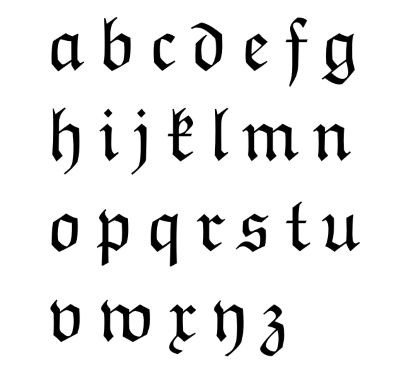
Squidspot.com has created an interesting period table of typefaces.
Related post: Periodic table of Perl operators
The blog of John D. Cook
From the category archives:
Squidspot.com has created an interesting period table of typefaces.
Related post: Periodic table of Perl operators
{ 3 comments }
A lot of good (La)TeX resources come from Germany. I assume from the amount of development and support activity, there are probably a lot of users as well. Does anyone know why TeX is apparently so strong in Germany? Is there something about the German language that TeX supports particularly well?
{ 11 comments }
Fonts, translations, and programming languages have one thing in common: they work best when you don’t notice them.
If someone says “Hey, look at this cool font I just found!” you probably wouldn’t want to read a book set in that font. At least to an untrained eye, a great font will not stand out in a list of small samples. You have to see large blocks of text set in a font to appreciate it. Even then, most people will not consciously appreciate a very readable font.
Translations are similar. If you find yourself saying “What an interesting translation!” then the translator has probably fallen down on the job. A good translation is neither archaic nor trendy. It does not draw attention to itself but allows you to focus on the original content. I believe the English Standard Version achieves that with Bible translation.
Python is like a good font or a good translation. For years I’d look into Python briefly when someone would recommend it. I’d thumb through a Python book, but it all looked rather plain. Only later did I come to appreciate that the beauty of Python is that it is rather plain. It doesn’t call attention to itself. It just gets out of your way and lets you write programs. It seems to me that compared to other programming language communities, the Python community brags less about their language per se and more about what they’re able to do with it.
{ 4 comments }
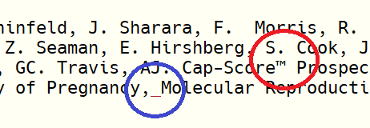
The default installation of R on Windows uses Courier New for the console font. Unfortunately, this font offers low contrast between the letter ‘l’ and the number ‘1.’ There is also poor contrast between the letter ‘O’ and the number ‘0.’ The contrast between period and commas is OK.
Lucida Console is an improvement. It has high contrast between ‘l’ and ‘1′, though ‘O’ and ‘0′ are still hard to distinguish. But my favorite console font is Consolas. It offers strong contrast between ‘l’ and ‘1′, commas and periods, and especially between lower case ‘o’, upper case ‘O’, and the number ‘0.’

Consolas is more legible while also fitting more characters into the same horizontal space. It can do this because it uses ClearType anti-aliasing while the other two fonts do not. Here is a sample of the three fonts magnified 4x to show the anti-aliasing.

I found setting the default console font in R a little tricky. Clicking on the Edit -> GUI preferences menu brings up the Rgui Configuration Editor. From there it’s obvious how to change the font. However, what I found surprising is that clicking the “OK” button only changes the font for the current session. I can’t think of another application that behaves analogously. To set your choice of font for all future sessions, click “Save” rather than “OK.”
{ 2 comments }
Basic tasks are simple in CSS, but even slightly harder tasks can be incredibly difficult. Controlling fonts, margins, and so forth is a piece of cake. But controlling page layout is another matter. In his book Refactoring HTML, Elliotte Rusty Harold describes a technique as
so tricky that it took any smart people quite a few years of experimentation to develop the technique show here. In fact, so many people searched for this while believing that it didn’t actually exist that this technique goes under the name “The Holy Grail.”
What is the incredibly difficult task that took so many years to discover? Teaching a web browser to play chess using only style sheets? No, three column layout. I kid you not. He goes on to say
The goal is simple: two fixed-width columns on the left and the right and a liquid center for the content in the middle. (That something so frequently needed was so hard to invent doesn’t speak well of CSS as a language, but it s the language we have to work with.)
You can read more about the Holy Grail of CSS in an article by Matthew Levine.
I appreciate the advantages of CSS, though I do wish it didn’t have such a hockey stick learning curve. I’ve heard people say not to bother learning overly difficult technologies because if you find it too difficult, so will everyone else and it will die off. But CSS seems to be firmly established with no competitor.
{ 5 comments }
I use LaTeX for math documents and PowerPoint for presentations. When I need to make a math presentation, I can’t have everything I want in one environment. I usually go with PowerPoint.
Yesterday I tried the LaTeX Beamer package based on a friend’s recommendation. I believe I’ll switch to using this package as my default for math presentations. Here are my notes on my experience with Beamer.
Installation
Beamer is available from SourceForge. The installation instructions begin by saying “Put all files somewhere where TeX can find them.” This made me think Beamer would be another undocumented software package, but just a few words later the instructions point to a 224-page PDF manual with plenty of detail. However, I would recommend a couple minor corrections to the documentation.
mpm.exe or GUI mpm_mfc.exe.)latex-beamer, pgf, and xcolor. The Package Manager shows no latex-beamer package, but does show a beamer package.The installation went smoothly overall. However, the MiKTeX Package Manager doesn’t let you know when packages have finished installing. You just have to assume when it quits giving new messages that it must be finished. At least that was my experience using the graphical version.
Using Beamer
I found Bruce Byfield’s introduction to Beamer helpful. The Beamer package is simple to use and well documented.
It’s nice to use real math typography rather than using PowerPoint hacks or pasting in LaTeX output as images. I also like animating bullet points simply by adding \pause to the end of an enumerated item.
Inserting images
The biggest advantage that PowerPoint has over LaTeX is working with images. With PowerPoint you can:
The last point may not seem like much until you’ve tried to figure out how to include images in LaTeX.
{ 11 comments }