Line of position (LOP)

The previous post touched on how Lewis and Clark recorded celestial observations so that the data could be turned into coordinates after they returned from their expedition. I intend to write a series of posts about celestial navigation, and this post will discuss one fundamental topic: line of position (LOP).

Pick a star that you can observe [1]. At any particular time, there is exactly one point on the Earth’s surface directly under the star, the point where a line between the center of the Earth and the star crosses the Earth’s surface. This point is called the geographical position (GP) of the star.

This GP can be predicted and tabulated. If you happen to be standing at the GP, and know what time it is, these tables will tell your position. Most likely you’re not going to be standing directly under the star, and so it will appear to you as having some deviation from vertical. The star would appear at the same angle from vertical for ring of observers. This ring is called the line of position (LOP).
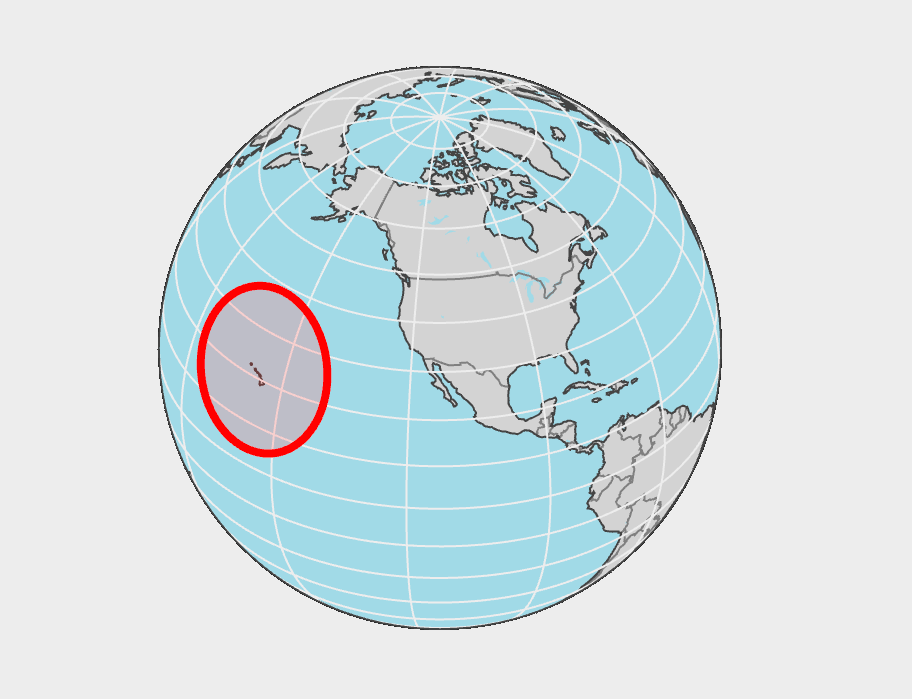
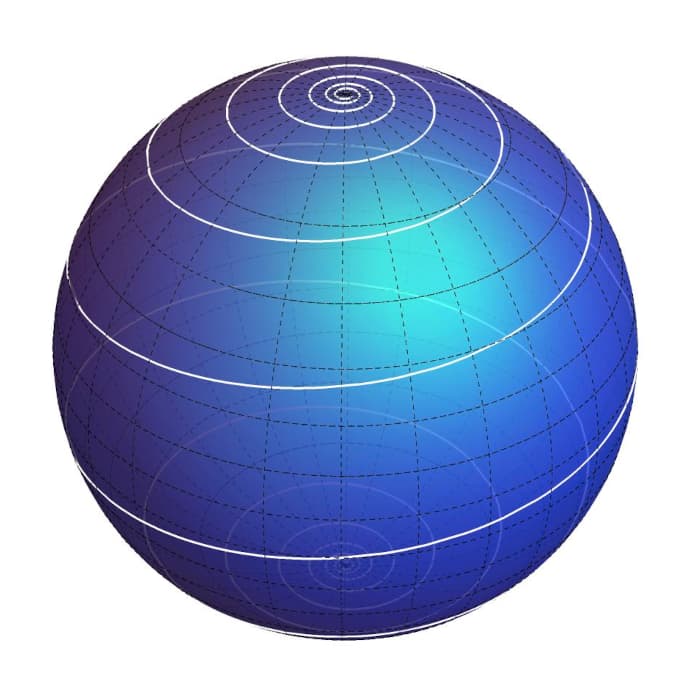
An LOP of radius 1200 miles centered at a GP at Honolulu

The LOP is a “small circle” in a technical sense. A great circle is the intersection of the Earth’s surface with a plane through the Earth’s center, like a line of longitude. A small circle is the intersection of the surface with a plane that does not pass through the center, like a line of latitude.

The LOP is a small circle only in contrast to a great circle. In fact, it’s typically quite large, so large that it matters that it’s not in the plane of the GP. You have to think of it as a slice through a globe, not a circle on a flat map, and therein lies some mathematical complication, a topic for future poss. The center of the LOP is the GP, and the radius of the LOP is an arc. This radius is measured along the Earth’s surface, not as the length of a tunnel.

One observation of a star reduces your set of possible locations to a circle. If you can observe two stars, or the same star at two different times, you know that you’re at the intersection of the two circles. These two circles will intersect in two points, but if you know roughly where you are, you can rule out one of these points and know you’re at the other one.


[1] At the time of the Lewis and Clark expedition, these were the stars of interest for navigation in the northern hemisphere: Antares, Altair, Regulus, Spica, Pollux, Aldeberan, Formalhaut, Alphe, Arieties, and Alpo Pegas. Source: Undaunted Courage, Chapter 9.
Lewis & Clark geolocation

I read Undaunted Courage, Stephen Ambrose’s account of the Lewis and Clark expedition,  several years ago [1], and now I’m listening to it as an audio book. The first time I read the book I glossed over the accounts of the expedition’s celestial observations. Now I’m more curious about the details.

The most common way to determine one’s location from sextant measurements is Hilare’s method [2], developed in 1875. But the Lewis and Clark expedition took place between 1804 and 1806. So how did the expedition calculate geolocation from their astronomical measurements? In short, they didn’t. They collected data for others to turn into coordinates later. Ambrose explains

With the sextant, every few minutes he would measure the angular distance between the moon and the target star. The figures obtained could be compared with tables show how those distances appeared at the same clock time in Greenwich. Those tables were too heavy to carry on the expedition, and the work was too time-consuming. Since Lewis’s job was to make the observations and bring them home, he did not try to do the calculations; he and Clark just gathered the figures.

The question remains how someone back in civilization would have calculated coordinates from the observations when the expedition returned. This article by Robert N. Bergantino addresses this question in detail.

Calculating latitude from measurements of the sun was relatively simple. Longitude was more difficult to obtain, especially without an accurate way to measure time. The expedition had a chronometer, the most expensive piece of equipment on the expedition that was accurate enough to determine the relative time between observations, but not accurate enough to determine Greenwich time. A more accurate chronometer would have been too expensive and too fragile to carry on the voyage.

For more on calculating longitude, see Dava Sobel’s book Longitude.

Related posts

[1] At least 17 years ago. I don’t keep a log of what I read, but I mentioned Undaunted Courage in a blog post from 2008.

[2] More formally known as Marcq Saint-Hilaire’s intercept method.

Mollweide map projection and Newton’s method

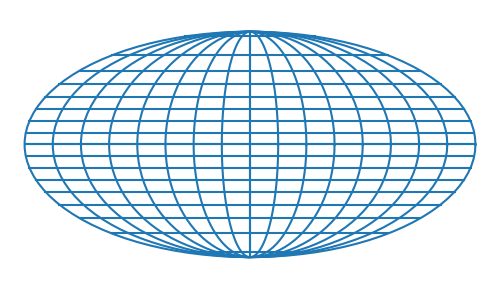
Mollweide projection

Karl Brandan Mollweide (1774-1825) designed an equal-area map projection, mapping the surface of the earth to an ellipse with an aspect ratio of 2:1. If you were looking at the earth from a distance, the face you’re looking at would correspond to a circle in the middle of the Mollweide map [1]. The part of the earth that you can’t see is mapped to the rest of the ellipse.

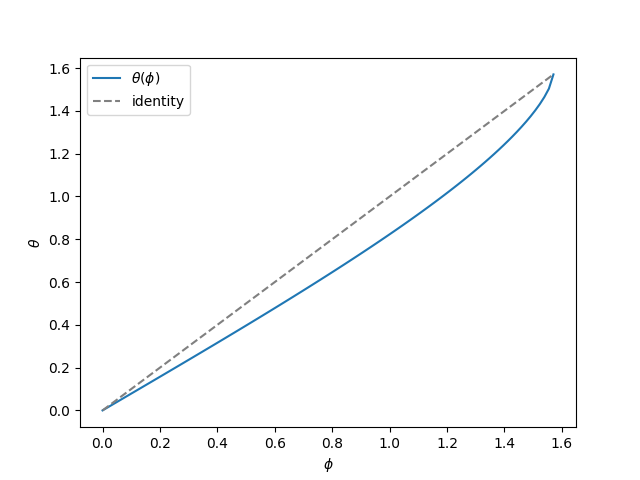
The lines of latitude are not quite evenly spaced; some distortion is required to achieve equal area. Instead, latitude φ corresponds to θ on the map according to the equation

2\theta + \sin(2\theta) = \pi \sin( \varphi)

There is no closed-form solution for θ as a function of φ and so the equation must be solved numerically. For each φ we have to find the root of

f(\theta) = 2\theta + \sin(2\theta) - \pi \sin(\varphi)

Here’s a plot of θ as a function of φ.

Newton’s method

Newton’s method works efficiently (converges quadratically) except when φ is close to π/2. The reason Newton’s method slows down for high latitudes is that f and its derivative are both at π/2, i.e. f has a double root there.

Newton’s method slows down from quadratic to linear convergence near a double root, but there is a minor modification that maintains quadratic convergence near a double root.

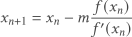
x_{n+1} = x_n - m\frac{f(x_n)}{f^\prime(x_n)}

When m = 1 this is the usual form of Newton’s method. Setting m = 2 tunes the method for double roots.

The modified version of Newton’s method with m = 2 works when the root you’re trying to is exactly a double root. However, if you’re trying to find a root near a double root, setting m = 2 can cause the method to diverge, so you have to be very careful with changing m.

Illustration

Here’s a version of Newton’s method, specialized for the Mollweide equation. We can specify the value of m, and the initial estimate of the root defaults to θ = φ.

from numpy import sin, cos, pi

def mynewton(phi, m, x0 = None):
    x = x0 if x0 else phi
    delta = 1
    iterations = 0
    
    while abs(delta) > 1e-12:
        fx = 2*x + sin(2*x) - pi*sin(phi)
        fprime = 2 + 2*cos(2*x)
        delta = m*fx/fprime
        x -= delta
        iterations += 1

    return (x, iterations)

Far from the double root

Say φ = 0.25 and m = 1. When we use the default initial estimate Newton’s method converges in 5 iterations.

Near the double root

Next, say φ = π/2 − 0.001. Again we set m = 1 and use the default initial estimate. Now Newton’s method takes 16 iterations. The convergence is slower because we’re getting close to the double root at π/2.

But if we switch to m = 2, Newton’s method diverges. Slow convergence is better than no convergence, so we’re better off sticking with m = 1.

On the double root

Now let’s say φ = π/2. In this case the default guess is exactly correct, but the code divides by zero and crashes. So let’s take our initial estimate to be π/2 − 0.001. When m = 1, Newton’s method takes 15 steps to converge. When m = 2, it converges in 6 steps, which is clearly faster. However, both cases the returned result is only good to 6 decimal places, even though the code is looking for 12 decimal places.

This shows that as we get close to φ = π/2, we have both a speed and an accuracy issue.

A better method

I haven’t worked this out, but here’s how I imagine I would fix this. I’d tune Newton’s method, preventing it from taking steps that are too large, so that the method is accurate for φ in the range [0, π/2 − ε] and use a different method, such as power series inversion, for φ in [π/2 − ε, π/2].

Update: The next post works out the series solution alluded to above.

Related posts

[1] Someone pointed out on Hacker News that this statement could be confusing. The perspective you’d see from a distance is not the Mollweide projection—that would not be equal area—but it corresponds to the same region. As someone put it on HN “a circle in the center corresponds to one half of the globe.”

US Census area hierarchy

Some kinds US Census geographic areas nest into a tidy hierarchy, but others do not. Here’s a brief overview of both.

Hierarchical entities

The orderly hierarchy is

  • nation
  • region
  • division
  • state
  • county
  • census tract
  • block group
  • census block.

All cleanly nested.

There are four regions: West, Midwest, Northeast, and South. Each region splits into two or three divisions. Each state falls within one division.

States are divided into counties, counties are divided into census tracts, census tracts are divided into block groups, block groups are divided into census blocks.

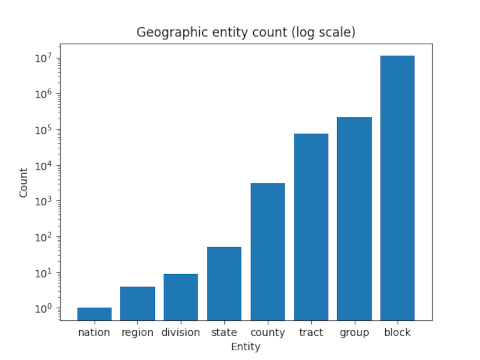
The number of entities at each level of the hierarchy is approximately geometrically increasing as show in the following log-scale bar graph. The number of entities at each level was based on the 2010 census.

1 nation, 4 regions, 9 divisions, 50 states, 3143 counties, 74134 tracts, 220742 block groups, 11166336 blocks

Organic entities

The Postal Service cares how mail delivery points are clustered and doesn’t care so much for legal and administrative borders. For this reason, zip codes represent mail delivery points and not geographic regions per se.

Zip codes are subject to change, and can straddle county or even state lines. Zip codes make sense from the US Postal Service, and they are their codes after all. But the temptation to use zip codes as geographic areas is so great that it is often done, even though it results in occasional strange behavior.

The US Census does not use zip codes per se, but rather Zip Code Tabulation Areas (ZCTAs), which basically correspond to zip codes, but rationalize them a bit from the perspective of geography.

Urban Areas and Core Based Statistical Areas (CBSAs) are based around cities, and since for practical purposes a city can spread across state lines, Urban Areas and CBSAs can cross state lines. The organic growth of a city may cross state lines, even if legally the city is divided into two cities.

Census blocks

Census blocks accommodate both the hierarchical and organic geographic areas. That is, a census block is contained entirely within a block group (which is contained within a census tract, which is contained within a county, …) but also within a single ZCTA and a single CBSA.

Related posts

A disk around Paris

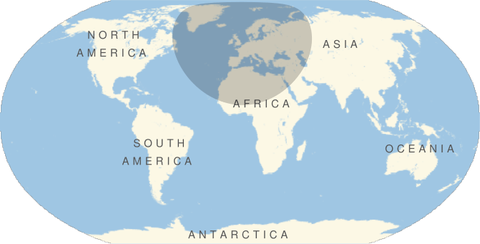
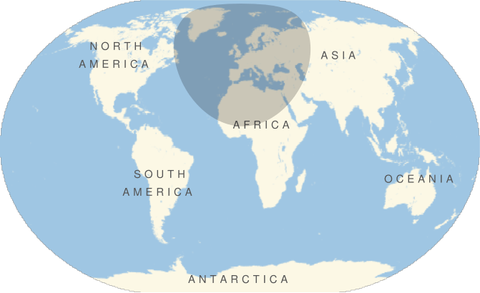
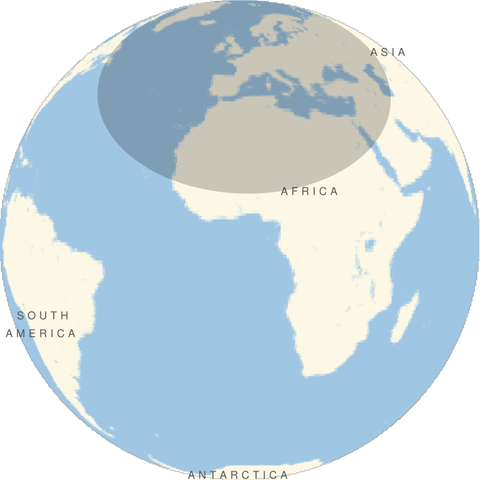
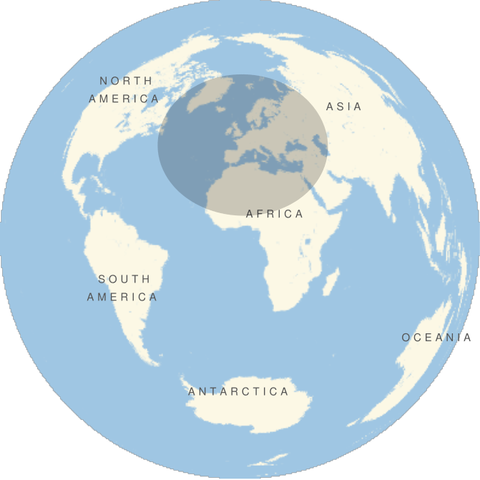
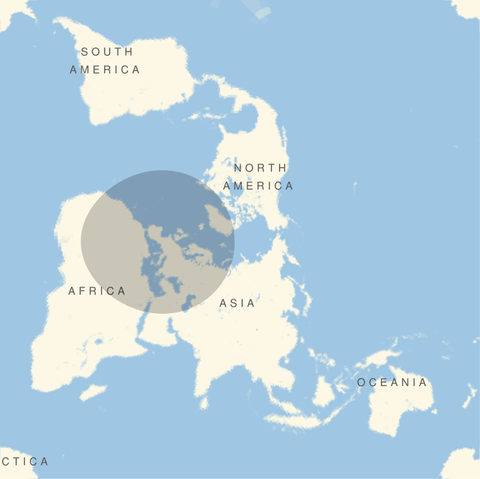
The other day I saw an image of a large disk centered on Paris subjected to the Mercator projection. I was playing around in Mathematica and made similar images for different projections. Each image below is a disk of radius 4200 km centered on Paris (latitude 49°, longitude 2°).

All images were produced with the following Mathematica code, changing the GeoProjection argument each time.

    GeoGraphics[GeoDisk[GeoPosition[{49, 2}],
       Quantity[4200, "Kilometers"] ],
       GeoProjection -> "...", 
       GeoRange -> "World"]

Robinson projection

    … GeoProjection -> "Robinson", …

Robinson projection

Winkel-Snyder projection

    … GeoProjection -> "WinkelSnyder", …

Winkel-Snyder projection

Orthographic projection

    … GeoProjection -> "Orthographic", …

Orthographic projection

Lambert Azimuthal projection

    … GeoProjection -> "LambertAzimuthal", …

Lambert Azimuthal projection

Peirce Quincuncial projection

    … GeoProjection -> "PeirceQuincuncial", …

Peirce Quincuncial projection

This last projection has some interesting mathematics and history behind it. See this post for the backstory.

Creating a Traveling Salesman Tour of Texas with Mathematica

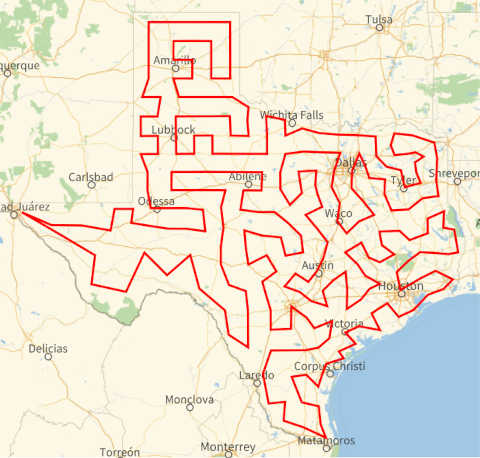
A Traveling Salesman tour visits a list of destinations using the shortest path. There’s an obvious way to find the shortest path connecting N points: try all N! paths and see which one is shortest. Unfortunately, that might take a while.

Texas has 254 counties, and so calculating a tour of Texas counties by brute force would examine 254! paths, over 10500 paths. In theory, large Traveling Salesman problems are unsolvable. In practice they can often be solved quickly. As is often the case, the key is to give yourself just a little slack and look for solutions that are close to optimal.

I’ve used the example of a Traveling Salesman tour of Texas before because it makes a nice visual. People asked me for the code that made the image, but I didn’t save the code and didn’t remember offhand how to re-create it. So here’s the code for future reference.

Incidentally, computing the tour itself took only a second or two. Creating the visualization took several seconds.

    texas = Entity["AdministrativeDivision", "Texas"]; 
    counties = texas["Subdivisions"];
    tour = FindShortestTour[texas["Subdivisions"]];
    GeoGraphics[{Thick, Red, GeoPath[counties[[tour[[2]]]]]}]

Here counties is a list of objects representing Texas counties, sorted by alphabetical order, from Anderson County to Zavala County.

The tour object is a pair of a distance and a list of integers. The distance, 6780.74 nautical miles, is the length of the tour. The integers are the indexes of the counties in the tour.

{6780.74 nmi, {1, 107, 234, …, 201, 37, 1}}

The tour starts with the first county, Anderson County. It’s got to start somewhere, and I expect it always starts with the first item in the list. Next it goes to the 107th county, Henderson County, and so on. Because FindShortestTour returns a closed tour, the tour ends where it started, in Anderson County.

Related posts: Traveling Salesman tours of Africa, Americas, Eurasia and Oceania.

Mercator and polar projections

This post is a more quantitative version of the previous post. Before I said that straight lines on a Mercator projection map correspond to loxodrome spirals on a sphere. This post will make that claim more explicit.

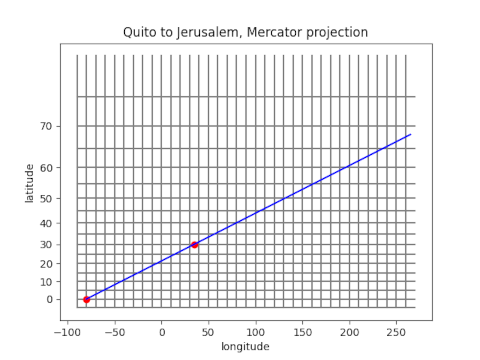
So suppose we plot a straight path from Quito to Jerusalem on a Mercator projection.

Quito to Jerusalem on a Mercator projection

The red dot in the lower left corner represents Quito and the next red dot represents Jerusalem.

Mercator projection leaves longitude λ unchanged, but latitude φ is transformed via

φ ↦ log( sec φ + tan φ )

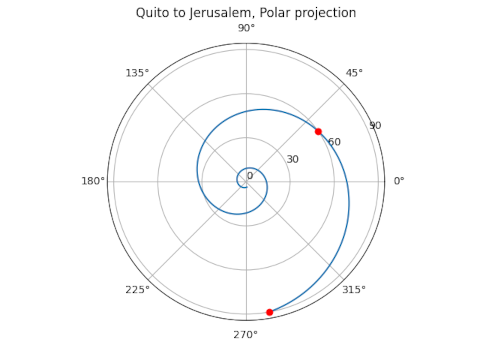
for reasons explained here. We can apply the inverse of the Mercator projection to put the path above on a globe, and when we do, it looks like the following.

Loxodrome path from Quito to Jerusalem on a polar plot

The path planned on a Mercator projection map when projected onto the globe becomes a logarithmic spiral in polar projection. The radial direction in the plot above shows the angle down from the North Pole rather than the angle up from the equator.

So if our flight of constant bearing keeps going rather than stopping at Jerusalem, it will spiral quickly toward the North Pole. It appears to stop at pole unless you look carefully. In theory the spiral keeps going and never actually reaches the pole. This is easy to see on the Mercator map because the North Pole is infinitely far away on the vertical axis.

Straight on a map or straight on a globe?

Straight lines on a globe are not straight on a map, and straight lines on a map are not straight on a globe.

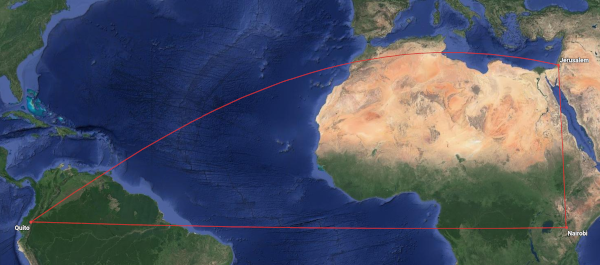
A straight line on a globe is an arc of a great circle, the shortest path between two points. When projected onto a map, a straight path looks curved. Here’s an image I made for a post back in August.

Quito to Nairobi to Jerusalem and back to Quito

The red lines form a spherical triangle with vertices at Quito, Nairobi, and Jerusalem. The leg from Quito to Nairobi is straight because it follows the equator. And the leg from Nairobi to Jerusalem is straight because it follows a meridian. But the leg from Quito to Jerusalem looks wrong.

If you were flying from Quito to Jerusalem and saw this flight plan, you might ask “Why aren’t we flying straight there, cutting across Africa rather than making a big arc around it? Are we trying to avoid flying over the Sahara?”

But the path from Quito to Jerusalem is straight, on a globe. It’s just not straight on the map. The map is not the territory.

Now let’s look at things from the opposite direction. What do straight lines on a map look like on a globe? By map I mean a Mercator projection. You could take a map and draw a straight line from Quito to Jerusalem, and it would cross every meridian at the same angle. A pilot could fly from Quito to Jerusalem along such a path without ever changing bearing. But the plane would have to turn continuously to stay on such a bearing, because this is not a straight line.

A straight line on a Mercator projection is a spiral on a globe, known as a loxodrome or a rhumb line. If a plane flew on a constant bearing from Quito but few over Jerusalem and kept going, it would spiral toward the North Pole. It would keep circling the earth, crossing the meridian through Jerusalem over and over, each time at a higher latitude. On a polar projection map, the plane’s course would be approximately a logarithmic spiral. The next post goes into this in more detail.

loxodrome spiral

I made the image above using the Mathematica code found here.

Although straight lines the globe are surprising on a map, straight lines on a map are even more surprising on a globe.

Related posts

Quirks in Mathematica’s administrative division data for Mexico

If you ask Mathematica for a list of Mexican states via

    CountryData["Mexico", "RegionNames"]

you will get a list of strings:

    "Aguascalientes", "Baja California", ..., "Zacatecas"}

However, when you try to turn this into a list of objects representing these states via

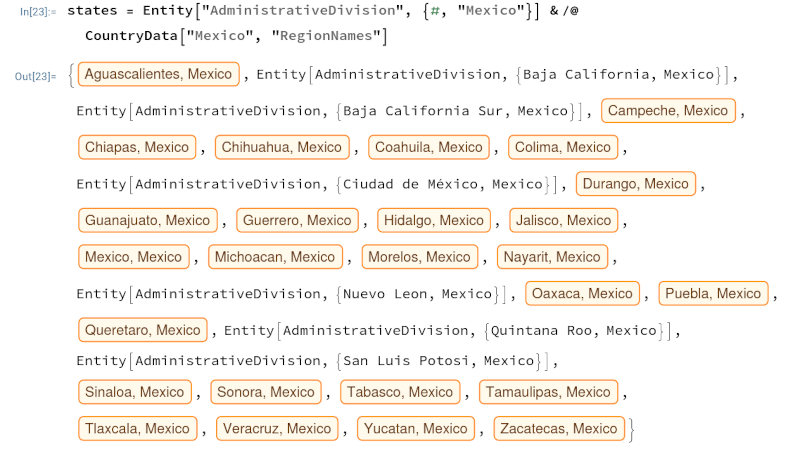
    states = Entity["AdministrativeDivision", {#, "Mexico"}] & /@ 
                 CountryData["Mexico", "RegionNames"]

something strange happens. Some items in the list are turned into useful objects, and some are uninterpreted symbols.

For example, Aguascalientes is recognized as an administrative division, but Baja California is not. It recognizes Oaxaca but not Nuevo León. The pattern is that states with a space are not recognized. There is an inconsistency in Mathematica: output names do not always match input names. To create the object representing Baja California, you need to pass in the string BajaCalifornia with no space.

    Entity["AdministrativeDivision", {"BajaCalifornia", "Mexico"}]

OK, so let’s remove spaces before we try to create a list of geographic objects.

    names = StringReplace[#, " " -> ""] & /@ 
               CountryData["Mexico", "RegionNames"]

This mostly works, but it trips up on Mexico City. The output name for the region is Ciudad de México, but Mathematica does not recognize CiudaddeMéxico as an administrative division. Mathematica does recognize MexicoCity as the name of a city but not as the name of an administrative division.

Changing CiudaddeMéxico to MexicoCity in the list of names did not fix the problem. But when I directly edited the list of state objects by replacing the uninterpreted value with the output running

    Entity["AdministrativeDivision", {"MexicoCity", "Mexico"}]

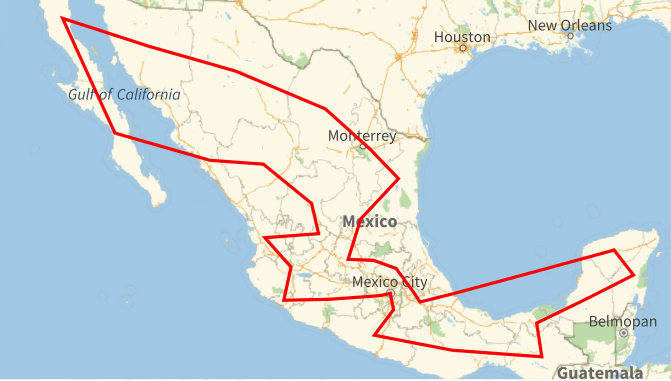
by itself everything worked. Then I was able to find a Traveling Salesman tour as in earlier posts (Africa, Americas, Eurasia and Oceania, Canada).

Traveling Salesman tour of Mexico

The tour is

  1. Baja California
  2. Baja California Sur
  3. Sinaloa
  4. Durango
  5. Zacatecas
  6. Aguascalientes
  7. Nayarit
  8. Jalisco
  9. Colima
  10. Michoacán
  11. México
  12. Mexico City
  13. Morelos
  14. Guerrero
  15. Oaxaca
  16. Chiapas
  17. Tabasco
  18. Campeche
  19. Quintana Roo
  20. Yucatán
  21. Veracruz
  22. Puebla
  23. Tlaxcala
  24. Hidalgo
  25. Querétaro
  26. Guanajuato
  27. San Luis Potosí
  28. Tamaulipas
  29. Nuevo León
  30. Coahuila
  31. Chihuahua
  32. Sonora

The tour is 8,343 kilometers.

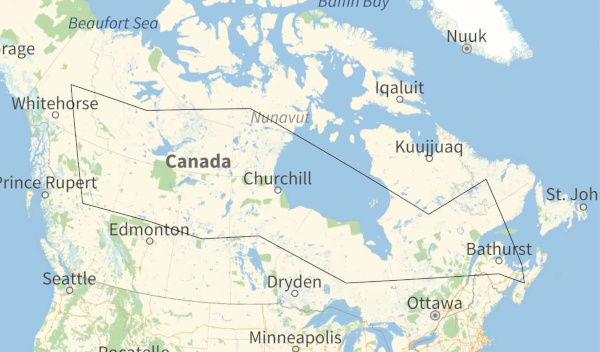
A traveling salesman tour of Canada

Here is a Traveling Salesman tour of Canada’s provinces and territories created by Mathematica. This is the shortest path connecting the geographic centers of the regions.

Here is a much larger (4.5 MB) PDF file of the same map with higher resolution.

Starting in the northwest, the tour is

  1. Yukon
  2. Northwest Territories
  3. Nunavut
  4. Quebec
  5. Newfoundland and Labrador
  6. Prince Edward Island
  7. Nova Scotia
  8. New Brunswick
  9. Ontario
  10. Manitoba
  11. Saskatchewan
  12. Alberta
  13. British Columbia

The tour is 11,070 km.

For more tours like this, see my earlier posts on tours of

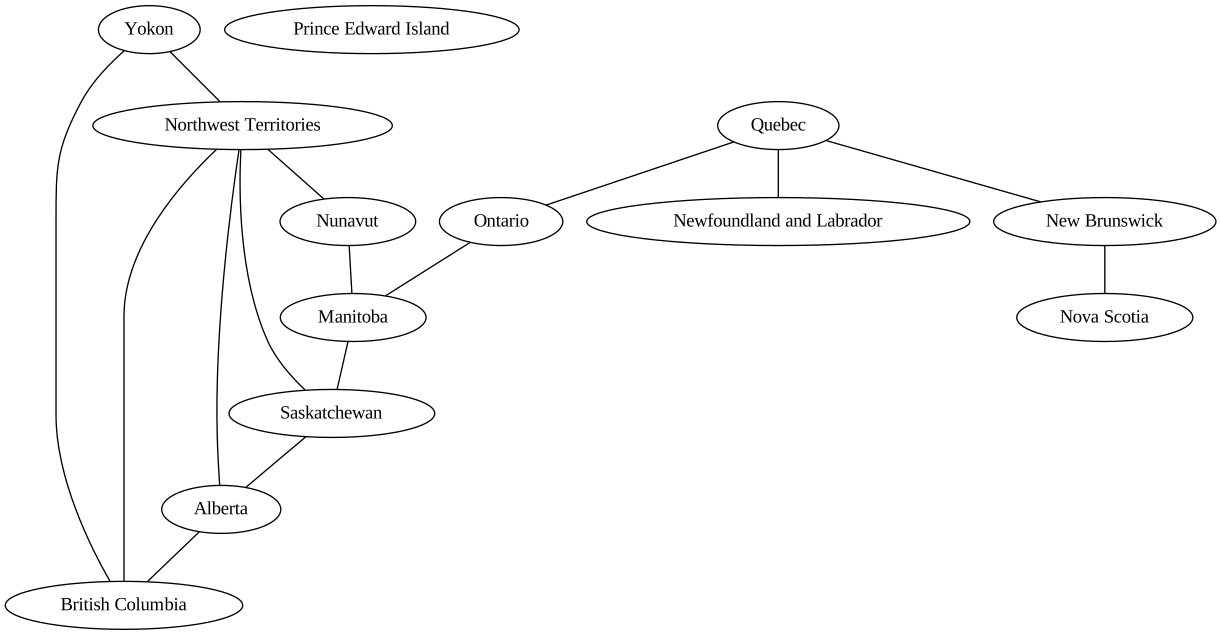
Update: Here is an adjacency network for Canadian provinces and territories.

This is an SVG image so you can scale it to make it easier to read if you’d like.

More adjacency graph posts: